 F12 Labs
 Bundles Pro
Bundles Pro documentation / Integrations
Create and update bundles with the API
Connect an ERP, PIM or script to Bundles Pro on the Pro plan. API keys, authentication, creating a bundle, polling the operation, updating title, price, status, channels and products, limits, errors, and how to retire a bundle.
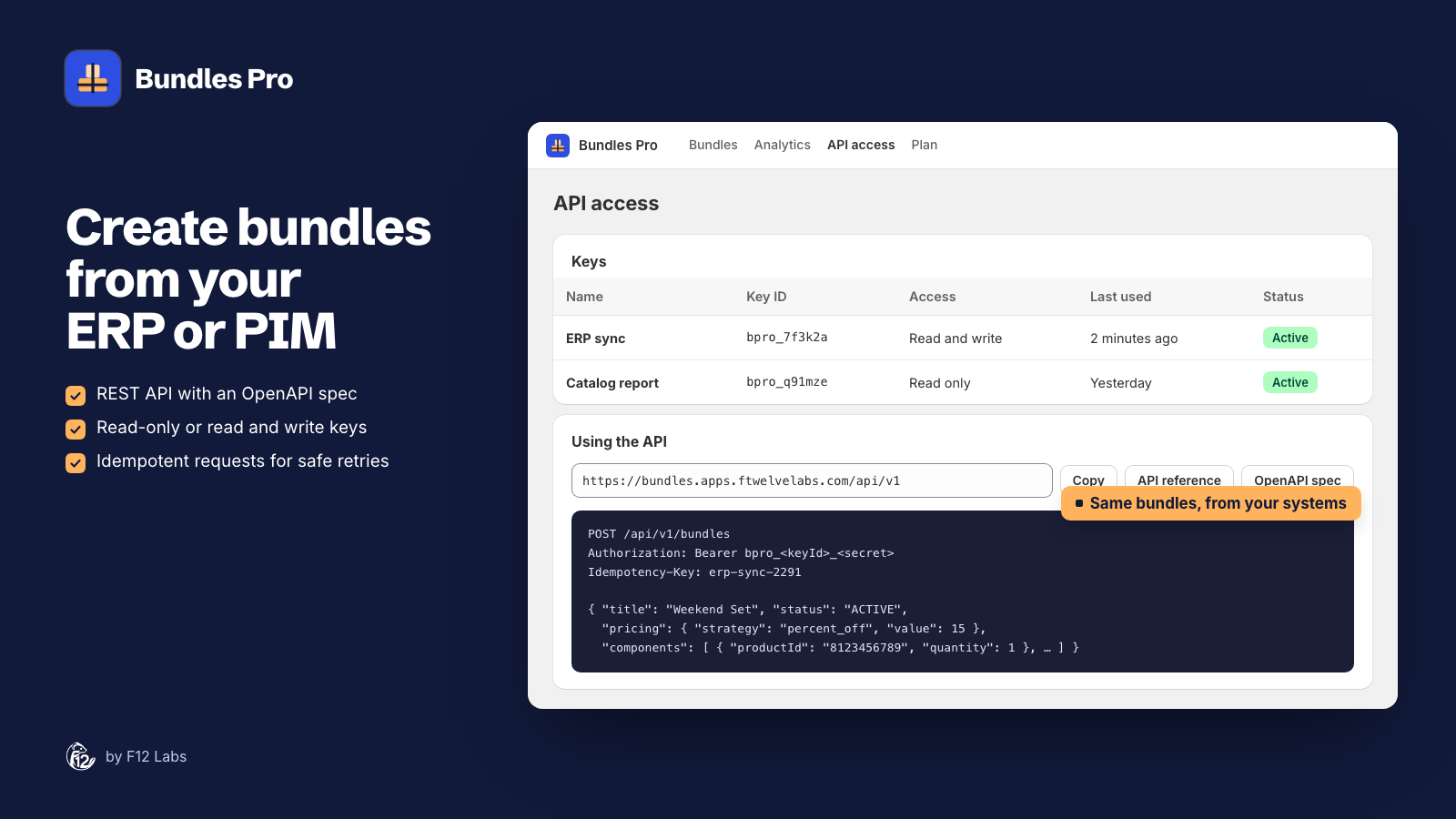
On the Pro plan, Bundles Pro has a REST API, so the system that owns your catalog (an ERP, a PIM, or your own scripts) can create and update bundles without anyone opening the admin. Bundles made through the API are the same native Shopify bundles you make in the app, and they show in the app, on product pages and in analytics.
Why the API goes through Bundles Pro
Shopify lets only the app that made a bundle change its products: "After an app has assigned components to a bundle, only that app can manage the components of the bundle." (Add a product fixed bundle) Your ERP's own connection to Shopify can't change the products inside a Bundles Pro bundle. The Bundles Pro API makes each change on the app's behalf, so Shopify accepts it.
What you can do
| You want to | Request |
|---|---|
| List your bundles | GET /bundles |
| Create a bundle | POST /bundles |
| Read one bundle, with its products, variant prices and channels | GET /bundles/{id} |
| Change title, status, price or channels | PATCH /bundles/{id} |
| Replace the products in a bundle | PATCH /bundles/{id} with components |
| Check a create or product change has finished | GET /operations/{id} |
| List the sales channels you can publish to | GET /channels |
The full reference, with every field and response, is at bundles.apps.ftwelvelabs.com/api/docs. The OpenAPI 3.1 spec is at /api/v1/openapi.json, for generating a client.
Create an API key
- In Bundles Pro, open API access. On the Free plan the page says API access is part of Pro. Upgrade from Plan first.
- Under Create an API key, enter a Name that says what uses it, for example "ERP sync".
- Choose Access: Read and write to create and update bundles, or Read only for reporting.
- Click Generate key, then Copy token, and store it in your integration's secrets.
A store can have 10 active keys. The Keys table shows each key's access and when it was last used. Revoke stops a key at once. Keys also stop working if the store moves to the Free plan or uninstalls the app.
To check a key works, use Fetch a sample bundle at the bottom of the page: pick a bundle, paste the token, and click Fetch bundle. It sends a real GET /bundles/{id} with your key and shows the response.
Authentication and limits
- Base URL:
https://bundles.apps.ftwelvelabs.com/api/v1 - Header:
Authorization: Bearer bpro_…on every request. A key belongs to one store, so you don't send the store's domain. - HTTPS only. Send JSON with
Content-Type: application/json, up to 64 KB per request. - Rate limit: 120 requests per minute per key. Responses include
X-RateLimit-Limit,X-RateLimit-RemainingandX-RateLimit-Reset. Over the limit you get429withRetry-Afterin seconds. - IDs: products, variants and bundles take Shopify's numeric ID (
8123456789) or the full ID (gid://shopify/Product/8123456789).
Create a bundle
POST /api/v1/bundles
Authorization: Bearer bpro_…
Content-Type: application/json
Idempotency-Key: erp-bundle-WKND-SET-1
{
  "title": "Weekend Set",
  "status": "ACTIVE",
  "pricing": { "strategy": "percent_off", "value": 15 },
  "publicationIds": ["gid://shopify/Publication/123456789"],
  "components": [
    { "productId": "8123456789", "quantity": 1 },
    { "productId": "8123456790", "variantIds": ["4512345678", "4512345679"], "quantity": 2 }
  ]
}
| Field | Required | What it does |
|---|---|---|
title |
Yes | The bundle's product name, up to 255 characters |
status |
No | ACTIVE or DRAFT. Default DRAFT |
pricing |
No | { "strategy": "sum" } (default), { "strategy": "percent_off", "value": 15 } (0 to 100), or { "strategy": "fixed_price", "value": 99.00 } in your store's currency |
components |
Yes | 1 to 30 products. Each has productId, quantity (1 to 2,000, default 1), and optional variantIds. Leave out variantIds to include every variant |
publicationIds |
No | The sales channels to publish to, from GET /channels. Leave it out and the API doesn't publish the bundle anywhere |
The response is 202 Accepted with an operation, because Shopify builds bundles in the background:
{
  "operation": { "id": "gid://shopify/ProductBundleOperation/987654321", "status": "CREATED", "productId": null },
  "warnings": []
}
Send an Idempotency-Key (any string up to 255 characters, unique per bundle you mean to create). If the request times out and you send it again with the same key, you get the first operation back (200, "replayed": true) instead of a second bundle. Your ERP's own bundle ID or SKU makes a good key.
warnings tells you when a variant selection grew. Shopify bundles include option values, not single variants, so picking Red / S and Blue / M includes Red / M and Blue / S too. The warning reads "…the 2 selected variants expand to 4 because bundles select option values, not individual variants."
Poll until it's done
GET /api/v1/operations/987654321
{
  "operation": {
    "id": "gid://shopify/ProductBundleOperation/987654321",
    "kind": "create",
    "status": "COMPLETE",
    "productId": "gid://shopify/Product/9612796559548",
    "title": "Weekend Set"
  }
}
CREATEDorACTIVE: still building. Poll again in a second or two.COMPLETE: done.productIdis the bundle's ID. Store it against your ERP record: that's how you update the bundle later.FAILED:errorsays why, for example a product that can't be in a bundle.
Update a bundle
PATCH /bundles/{id} takes any of the create fields. Only what you send changes.
Title, status, price or channels apply at once, and the response (200) is the updated bundle:
{ "status": "DRAFT", "pricing": { "strategy": "fixed_price", "value": 89.00 } }
Products (components) replace the whole list, so send every product the bundle should have, not just the new one. That goes through Shopify's background build again: you get 202 with an operation to poll, and any status or pricing in the same request is applied when it completes.
{
  "components": [
    { "productId": "8123456789", "quantity": 1 },
    { "productId": "8123456791", "quantity": 1 }
  ]
}
Channels: publicationIds is the exact list. Channels you leave out are unpublished, and [] unpublishes the bundle everywhere. Leave the field out to keep the channels as they are.
Retiring a bundle
There's no DELETE. To stop selling a bundle and keep its history:
{ "status": "DRAFT", "publicationIds": [] }
To delete it for good, delete the bundle's product in the Shopify admin. Bundles Pro removes it from its list and from the Buy the bundle instead block shortly after. If your ERP must delete it, it needs its own connection to Shopify's Admin API with permission to delete products.
Reading bundles
GET /bundles?limit=25 lists bundles made in Bundles Pro, through the app or the API, newest first (up to 100 per page). Pass nextCursor from the response as cursor for the next page; it's null on the last page.
GET /bundles/{id} returns the bundle with its components (product, quantity, included variantIds), every variant's price and compareAtPrice, pricing, status, publicationIds, and source (ui, api or shopify).
Errors
Errors are JSON with a code you can act on:
{ "error": { "code": "invalid_components", "message": "A bundle can have at most 30 components" } }
| Status | Codes | What to do |
|---|---|---|
| 400 | invalid_body, invalid_title, invalid_status, invalid_pricing, invalid_components, invalid_publications, invalid_id, invalid_json |
Fix the request |
| 401 | unauthorized, app_not_installed |
Check the token; the key may be revoked or the app uninstalled |
| 403 | insufficient_scope, plan_required |
Use a read and write key; the store must be on Pro |
| 404 | not_found |
Not a Bundles Pro bundle, or the operation isn't for this store |
| 413, 415 | payload_too_large, unsupported_media_type |
Keep the body under 64 KB and send JSON |
| 422 | product_not_found, variant_not_found, too_many_variants, invalid_bundle, invalid_publications |
The products or channels don't work as a bundle; invalid_bundle carries Shopify's reason in details |
| 429 | rate_limited |
Wait Retry-After seconds |
| 502 | shopify_error |
Shopify didn't answer; retry with backoff |
A bundle can have at most 250 variants (the product of each product's included option values). Above that you get too_many_variants: include fewer variants.
A sync pattern that works
- Keep a table in your ERP: your bundle ID → Bundles Pro
productId. - New bundle:
POST /bundleswith your bundle ID asIdempotency-Key, poll the operation, store theproductId. - Changed bundle:
PATCH /bundles/{productId}with only what changed. If the products changed, poll the operation. - Price change on a product inside:
PATCHeach bundle that contains it with itspricing. - Discontinued bundle:
PATCHwith"status": "DRAFT"and"publicationIds": []. - Stay under 120 requests a minute per key, and back off on
429.
Related
- Getting started with Bundles Pro: how pricing, variants and publishing work in the app.
- Bundles on the Shopify product page: API bundles show in the admin cards too.