 F12 Labs
How much revenue do your Shopify discounts actually bring in?
Shopify's Sales by discount report lists orders and sales per discount name. What it shows, why its rows don't add up and app discounts can be hard to read, what "revenue with a discount" does and doesn't tell you, and how to see each discount's orders, revenue and cost.
You're running a volume tier on hoodies, a free gift over $250 and staff pricing. At the end of the month, someone asks the obvious question: which of these is worth it?
To answer, you need two numbers per discount: how much revenue came from orders that used it, and how much it cost you in discounts. Then a third, for context: what share of all your orders used a discount at all.
Here's what Shopify's reports give you, where they get hard to read, and what to look for.
What Shopify does: the Sales by discount codes report
Shopify's Sales by discount codes report "displays your sales grouped by the name of the discount, such as the automatic discount name or discount code." Its fields include Discount amount, Orders and Total sales, and Discount type can be "Percentage, fixed amount, free shipping, buy X get Y, or App." (Sales reports)
Shopify's own summary: "You can use the Sales by discount report to learn how often your discount codes are used." (Discount codes FAQ)
For a single code, that's a good answer: how many orders used SUMMER20, what they came to, and what it cost.
Where it gets hard to read
- The rows don't add up. "If you have combinable discounts on your store, then the same order might be included multiple times." An order with a tier discount and free shipping is counted under both, so adding up Total sales overstates what discounted orders brought in.
- No share of orders. The report lists discounts. To see what part of your orders used one, you put it next to your total orders yourself.
- App discounts are grouped by name. The report groups by "the name of the discount". With Discountly's own discounts, a storefront order records the message the customer saw, such as "15% off at 4+", not which discount in the app it came from. A discount with three tiers can show up as three names, and two discounts that both say "Free gift" as one.
What "revenue with a discount" means
Before choosing a report, be clear what the number can tell you.
Revenue from orders that used a discount shows what a discount touched: how often it's used and how big those orders are. It doesn't show what the discount caused. Some of those customers would have bought anyway.
Discount given is what it cost: the dollars it actually took off.
Neither number alone says whether a discount pays. Together, and over time, they get close: if orders using the hoodie tier average $300 against a store average of $80, and the tier costs $12 an order, that's worth knowing. If the share of orders using a discount climbs while average order value stays flat, that's worth knowing too.
What to look for
- Revenue and discount given, per discount, in the same place.
- The share of all orders that used a discount, and how it moves over time.
- Breakdowns by type and inside a discount, such as which tier of a volume discount customers actually reach.
- The orders behind the numbers, so you can open one and check.
- Honest attribution. If an order can't be tied to one discount for certain, it should say so, rather than splitting the money by guesswork.
- Draft orders included, if staff create orders for customers.
How Discountly does it
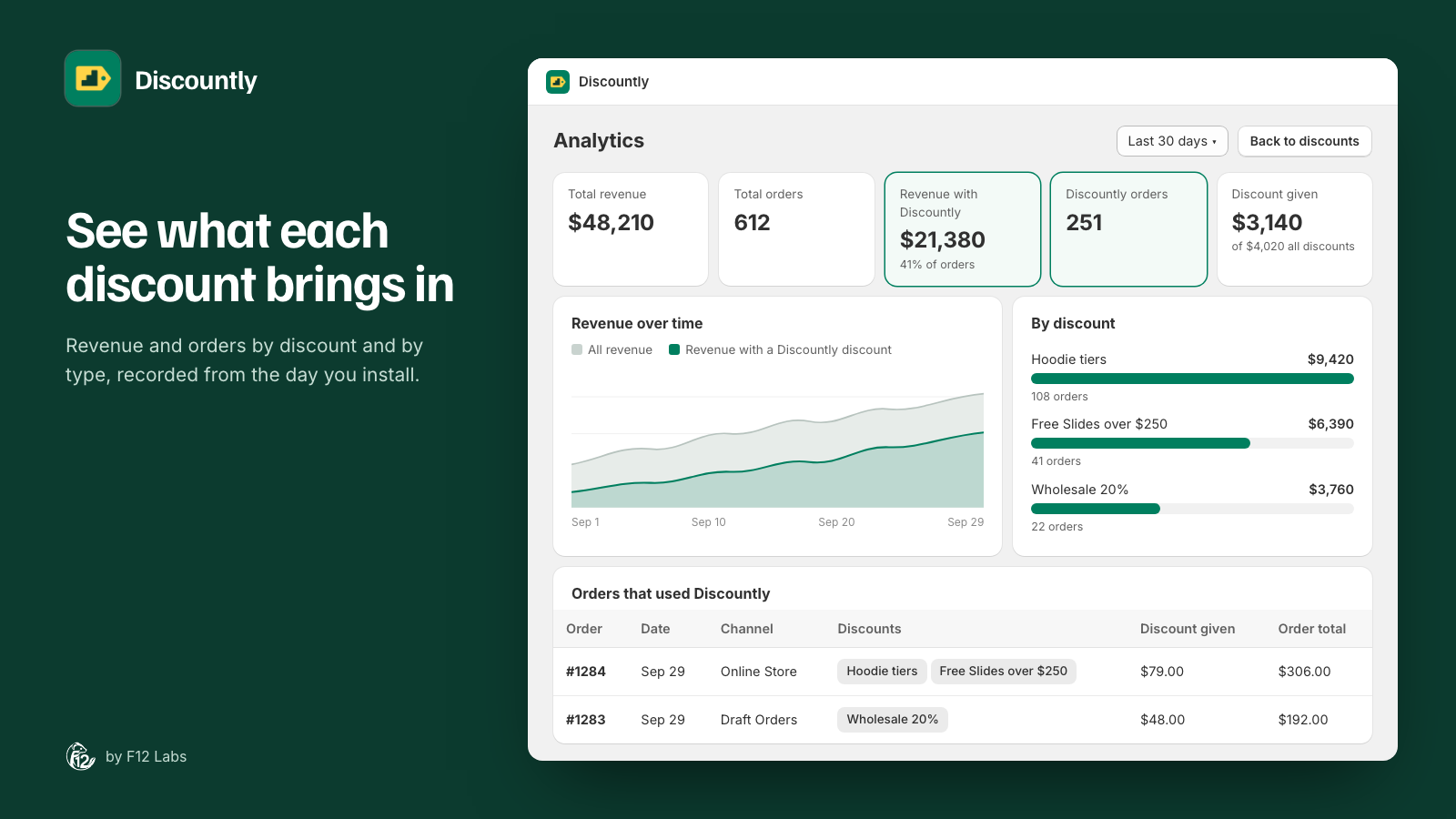
Discountly's Analytics page, opened from the Discounts page, shows:
- Five tiles for the range you pick (last 7, 30 or 90 days, or 12 months): Total revenue, Total orders, Revenue with Discountly with the share of orders that used a Discountly discount, Discountly orders, and Discount given, next to all the discounts given on orders in the range.
- Revenue over time: all revenue, and the part carrying a Discountly discount.
- By discount type and By discount: revenue and discount given for each. Select a discount to break it down by the logic inside it, as the customer saw it, such as each tier.
- Orders that used Discountly: each order with its date, channel (Online Store, Draft Orders and others), the discounts on it, the discount given and the order total, linked to the order in Shopify.
The Discounts page itself shows the last 30 days at a glance: revenue, orders, orders with a Discountly discount and discount given.
Two details that make the numbers trustworthy:
- Orders are matched to the right discount where possible. On draft orders and free gifts, Discountly marks its own lines, so the match is exact. On storefront orders, where Shopify records only the message, Discountly matches it to the discount that uses it. Rows matched this way carry a ~.
- Unclear money stays unclear. When two of your discounts use the same message, an order using it can't be split between them. Those dollars go to Unattributed instead of being shared out by guess.
The by-type breakdown counts an order once under each type it carries, so its revenue column doesn't add up to total revenue, and the page says so. Discount given does add up.
Analytics is on every Discountly plan.
Setting it up
There's nothing to turn on. Discountly records orders as they're placed and updated, from the day you install it.
- In Discountly, click Analytics on the Discounts page.
- Pick a range.
- Select a discount under By discount to see its logic and its orders.
Before you rely on it
- History starts at install. Orders from before you installed Discountly aren't included. Compare like with like: a month after install, not the month before.
- Give each discount its own message. Attribution on storefront orders goes by the message customers see. Two discounts that both say "10% off" can't be told apart; "10% off hoodies" and "10% off tees" can.
- It covers Discountly's discounts. Other discounts, such as Shopify discount codes, count toward the "all discounts" figure under Discount given, not toward a Discountly discount.
- It's a usage report, not a lift test. To measure what a discount adds, compare periods with it on and off, or look at average order value for orders with and without it.
Shopify behavior checked on 21 October 2026 against Shopify's help center: Sales reports and Discount codes FAQ. If Shopify changes how app discounts appear in its reports, we'll update this post.