 F12 Labs
Discount Shopify products by metafield or metaobject value
Shopify discounts apply to products or collections, not to a metafield like material, brand or "eligible for promo". How to get there with automated collections and metafield conditions, where that breaks, and how to target a discount by metafield and metaobject directly.
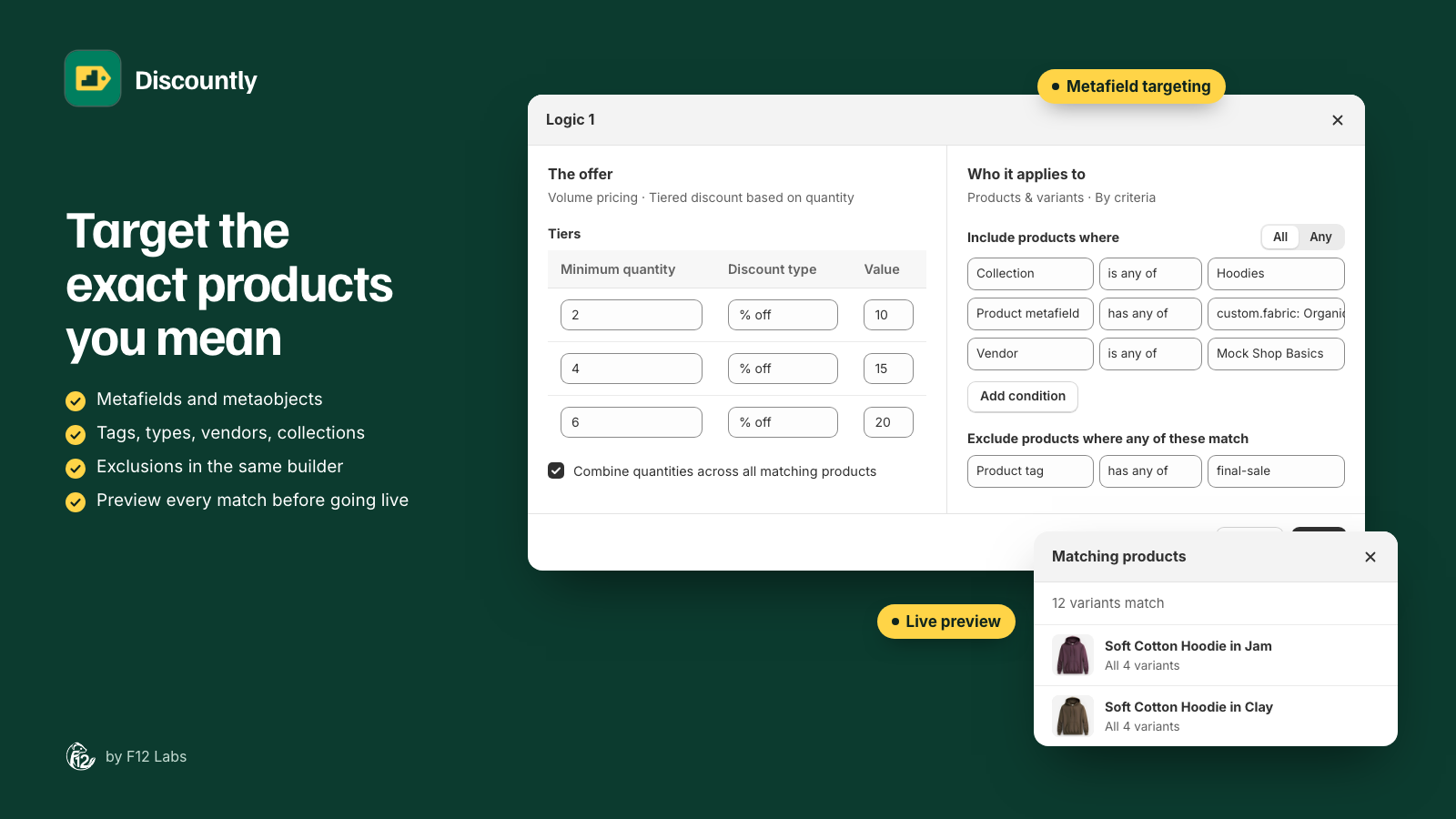
Your product data already knows which products should be on promotion. Every organic cotton item has custom.fabric set to "Organic". Every product from a brand points to that brand's metaobject entry. Some stores even keep a true or false field, "Eligible for promotions", so merchandising can opt products in and out.
Then you open Shopify's discount form, and it asks for products or collections. None of that data is there.
Here's how to bridge the two in Shopify, where that breaks down, and what to look for in a discount that reads your metafields directly.
What Shopify does: discounts pick products or collections
An Amount off products discount applies to the whole order, or "to specific products" (select Specific products, "and then add your products"), or to "specific collections". (Amount off discounts) Buy X get Y works the same way: qualifying items "can be set by product or collection." (Buy X get Y discounts)
There's no metafield option on the discount. To use your metafields, you go through a collection.
Option 1: An automated collection with a metafield condition
Automated collections can use metafield conditions, and "Collections by metafields is available for both product and variant metafields." Metaobject references work too: "You can set conditions for both product and variant metaobject reference metafields." (Understanding conditions for collections)
- Open the metafield definition in your settings and turn on its collections setting. Shopify requires it: "you need to activate the collections setting for the metafield definition."
- Create an automated collection with the condition, such as Fabric is equal to Organic.
- In your discount, choose Specific collections and pick it.
Where it breaks:
- Only some types and comparisons. Shopify lists true or false and single line text (one value or a list) with equality only, and integer, decimal and rating with equal to, greater than and less than. A multi-line text field, a date, or "a list of brands includes Acme" isn't on that list.
- The collections setting has a cap. Shopify allows "a maximum of 128 definitions per product metafield definitions and variant metafield definitions" with it turned on, and "a maximum of 60 total conditions" per collection.
- Variants are hard. A collection is a set of products. Shopify says that for a variant-based collection, category metafield conditions "narrow the collection to specific variants only when the related product option is connected." A metafield set on one variant, such as "this size is in the clearance", doesn't make a clean discount target.
- A collection per promotion. Every combination you want to discount ("organic, from this brand, not final sale") is another collection. Collections meant only for discounts pile up next to the ones shoppers browse.
- Two places to check. When a discount misses a product, you look at the discount, then the collection, then the product's metafield.
Good for: one or two promotions on a simple true or false or text field.
Option 2: Tag products from the metafield
Some stores copy the metafield into a tag (by hand, with Shopify Flow or with a bulk editor) and build the collection on the tag. It works with any metafield type, because the logic lives wherever you copy it.
But the tag is a second copy of the truth. Change the metafield and forget the tag, and the discount is wrong until someone notices. It still goes through a collection, with the same variant problem.
Good for: stores that already run Flow and are comfortable keeping the two in step.
What to look for in a fix
- Metafields as a target, product and variant, read straight from your product data.
- Metaobjects by entry. Pick "Acme" from the brand entries, rather than typing an ID or a name that might change.
- Lists. "Materials includes any of Organic, Recycled" and "includes all of".
- Numbers. "Weight is at least 5" or "Pack size is at most 3".
- Combined with the basics: collection, tag, type and vendor, with all or any, and exclusions ("but not tagged final-sale").
- Variant-level matches, so a variant metafield discounts that variant, not the whole product.
- Kept up to date as you edit products, without rebuilding anything.
- A preview of exactly which products and variants match, before the discount goes live.
- Calculated by Shopify at checkout, through Shopify Functions, so the cart, checkout and order agree.
How Discountly does it
Every Discountly discount type (volume pricing, product, order, shipping, Buy X get Y and free gift) can choose its products By criteria: the products a discount covers, the ones that trigger a reward, or the ones that count toward a free gift's minimum. You build "Include products where" from rows, with All or Any:
| Field | Conditions |
|---|---|
| Product metafield, Variant metafield | is any of, is at least / is at most (numbers), includes any of / includes all of (lists), is (true or false), has a value, is empty |
| Product tag | has any of, has all of |
| Product type, Vendor, Specific products | is any of |
| Collection | is in any of |
- Your definitions are picked up. Type the metafield's namespace and key; if your store has a definition for it, Discountly uses its type and name. Metaobject fields get a picker with the definition's entries, and fields with preset choices list them.
- Types: text, list of text, integer, decimal, true or false, metaobject and list of metaobjects, plus other single-value types your definitions use, such as dates, URLs and colors.
- No collections setting needed. Discountly reads the metafield itself, so you don't spend one of Shopify's 128 collection-enabled definitions.
- Variant metafields target variants. A variant metafield row matches just the variants that have the value.
- Exclusions in the same builder. "Exclude products where any of these match", such as Product tag has any of "final-sale".
- Up to 25 rows, each with up to 250 values.
- Kept current. Matching products are worked out in the background after you save, and again when products change, so a product that gets the metafield joins the discount on its own.
- Preview before it's live. The eye icon on a logic block lists the matching products and variants, with a CSV export.
Setting it up
- In Discountly, open a discount or click Create discount, then click Add logic (or Edit on a logic block).
- In Who it applies to, choose Specific products.
- Under Include products where, choose Product metafield, type the namespace and key (for example
customandfabric) and choose the values, such as "Organic". - Add more rows if you need them, such as Vendor is any of your brand, and choose All or Any.
- Add exclusions under Exclude products where any of these match.
- Click the eye icon to check the matching products, then Save and Save rule.
The targeting docs list every field and condition, with examples.
Before you rely on it
- Give it a few minutes after saving. Matching runs in the background. The logic block shows Finding matching products… until it's done, then how many match.
- Product edits catch up shortly after. A product you edit is re-checked within a few minutes, and Discountly re-checks the whole catalog every night as a safety net.
- Metaobjects match by entry, not by name. Renaming the "Acme" entry doesn't change what matches. Deleting it does.
- Empty means empty. is empty matches products where the field has no value, which includes every product you haven't filled in yet.
Shopify behavior checked on 21 October 2026 against Shopify's help center: Amount off discounts, Buy X get Y discounts and Understanding conditions for collections. If Shopify adds metafield targeting to its discounts, we'll update this post.