 F12 Labs
Moving from Magento to Shopify? Here's how to get Page Builder back
Magento's Page Builder lets merchants build pages from rows, columns and content types without a developer. Shopify has nothing quite like it. Here's what changes when you move, and how Aedify brings the Page Builder way of working to Shopify.
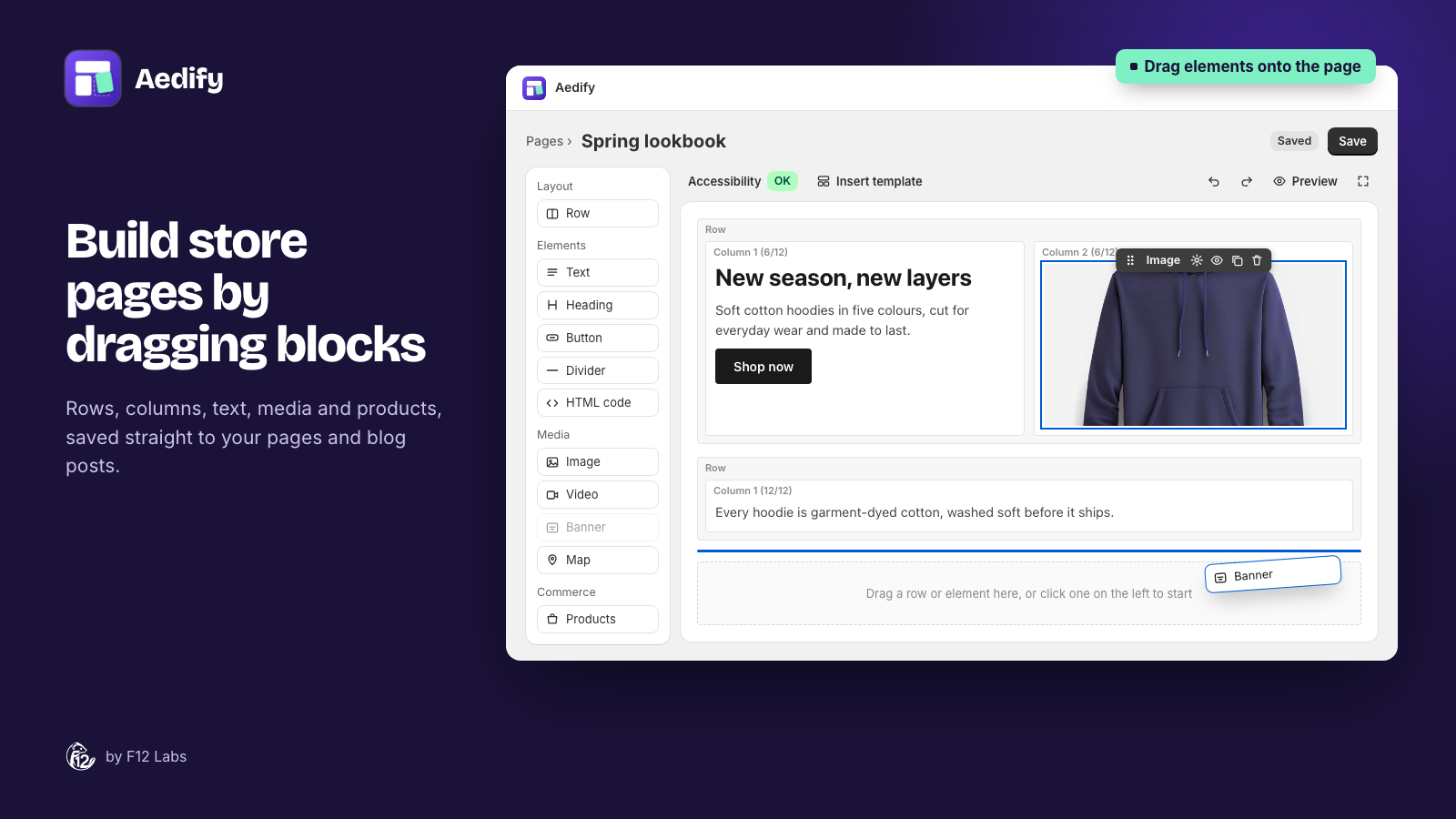
If you've run a store on Magento (now Adobe Commerce), you probably got used to Page Builder. You drag a row onto the stage, split it into columns, drop in a banner, a few buttons and a products carousel, and publish. No developer, no template files.
Then you move to Shopify, open a page, and find a rich text editor. It's one of the first things Magento merchants miss, and one of the most common questions after a migration: where did Page Builder go?
This post covers what Page Builder gave you, what Shopify offers instead, and how we built Aedify to bring the Page Builder way of working to Shopify.
What Magento's Page Builder gave you
Page Builder shipped with Adobe Commerce 2.3.1 in 2019. Since 2.4.3 it has also been bundled with Magento Open Source and is the default content editor in both. Its workspace is a stage where you build content, and a panel with four groups of content types:
| Group | Content types |
|---|---|
| Layout | Row, Column, Tabs |
| Elements | Text, Heading, Buttons, Divider, HTML Code |
| Media | Image, Video, Banner, Slider, Map |
| Add Content | Block, Dynamic Block, Products (and Product Recommendations on Adobe Commerce) |
Hover over anything on the stage and a toolbox appears: move it, open its settings, hide it, duplicate it or remove it. The same editor works on CMS pages, blocks, and product and category descriptions. And the result is saved as HTML in the content itself, so the page is just a page.
That mix (layout, content types, live products, reusable blocks, all in one editor) is what most migrating merchants are really asking for.
What Shopify gives you instead
Shopify splits the job in two:
- The page editor is a rich text editor: headings, lists, links, images, tables and embedded video, with a Show HTML button for the code underneath. There are no rows or columns. Content runs in one column.
- Theme templates let you build a page from your theme's sections in the theme editor, then assign that template to a page. But "when you edit a template, your changes apply to every page that uses the template", so each page with its own layout needs its own template. And the content you type into those sections is saved in the theme, not in the page.
Neither is Page Builder. The page editor has the per-page content but no layout. Templates have layout, but they belong to the theme, are shared across pages, and are edited somewhere other than the page itself.
Aedify: Page Builder's model, built for Shopify
When we designed Aedify, we started from Page Builder on purpose. Its model fits merchants: build pages from rows and columns, style each element when you need to, and keep everything in the page. So we kept the parts that work and changed the parts that don't fit Shopify.
The same building blocks
| Magento Page Builder | Aedify |
|---|---|
| Row, Column, Tabs | Row, Column, Tabs, plus Accordion |
| Text, Heading, Buttons, Divider, HTML Code | Text, Heading, Button, Divider, HTML code, plus Icon |
| Image, Video, Banner, Map | Image, Video, Banner, Map (no Google Maps API key needed) |
| Products: by category, SKU or condition | Products: by collection, by product (searchable by SKU) or by condition, as a grid or carousel |
| Block (reusable content) | Templates: save rows once, place them anywhere, edit once to update every page |
| CMS page, product and category description | Page, blog post, product and collection description |
The palette even keeps Page Builder's grouping: Layout, Elements, Media, and Commerce where Magento had Add Content.
The same way of working
- A stage with labelled rows and columns. Rows are light bands, columns sit inside them with their width shown, and you drop elements where you want them.
- A hover toolbar on every element: drag to move, settings, hide on storefront, duplicate, delete. It's the toolbox you know.
- Per-element styling. Margins, padding, background, border, radius and custom CSS on any element, in a settings drawer.
- Full-screen editing, as in recent Page Builder versions.
- HTML as the saved format. Like Page Builder, Aedify writes the layout as HTML into the content field: the page's body in Shopify. Your pages don't live in an app database, and they stay in Shopify if you ever uninstall.
What's different on Shopify, and why
- Your theme does the styling. Shopify themes are built to control the look of a store, so Aedify elements take your theme's fonts, colors and buttons by default. Style an element yourself and it stops inheriting. On Magento you'd often restyle content to match the theme; here it starts out matching.
- Live commerce through your theme. Products, Collections and Blog posts elements are filled in by Shopify when the page loads, with today's prices and stock and a working add-to-cart button. That needs one block added to your page template. Aedify's setup checklist adds it for you, with one click per step.
- Templates are linked, not copied. A placed template stays connected: edit it and every page using it updates, which is closer to Magento's Block content type than to applying a template. Aedify also comes with 23 starter templates: sale banners, heroes, feature rows, FAQ accordions and more.
- Accessibility built in. Aedify checks the page as you build, against WCAG 2.1 AA: missing alt text, empty headings, low-contrast text on banners, skipped heading levels. Each issue has a Select button that takes you to the element.
- What's not there. Aedify has no equivalent of Dynamic Blocks (content that changes by customer segment) or Product Recommendations, and no standalone Slider element yet. Products, collections and blog posts can show as carousels.
A migration checklist for your content pages
If you're moving CMS pages from Magento to Shopify:
- List the pages that matter. Look at traffic and links, not just the page count. Most stores have a handful of pages that do real work: About us, size guides, landing pages, a wholesale page.
- Keep the URLs working. Shopify pages live at
/pages/your-handle. Add a URL redirect in Shopify (you'll find URL redirects from Online Store → Navigation) from each old Magento URL to its new page. - Bring the text across, then rebuild the layout. Magento's Page Builder HTML depends on Magento's styles, so pasting it into Shopify rarely looks right. Move the words and images, then rebuild the layout in rows and columns.
- Swap category widgets for live products. Wherever a Magento page showed a category's products, use a Products element with the matching Shopify collection.
- Recreate reusable blocks as templates. Magento CMS blocks you placed on several pages become Aedify templates you place the same way.
- Check headings and alt text. Your Shopify theme prints the page title as the main heading, so start the page's own headings at H2. Aedify's accessibility check flags anything you miss.
If you're coming from Magento and want to see how it feels, the getting started guide walks through installing Aedify and building your first page.
Magento details checked on 11 October 2026 against Adobe's documentation: Page Builder workspace, Page Builder templates and the Magento Open Source 2.4.3 release notes. Shopify details: Templates and Using the rich text editor.