 F12 Labs
Why your Shopify bundle price didn't change when the product price did
You raised the price of a hoodie, and the bundle it's in still sells at the old total. Shopify bundles keep their own price. Why that happens, why a CSV import won't fix it, how to find every bundle a price change affects, and how to price bundles so repricing is one step.
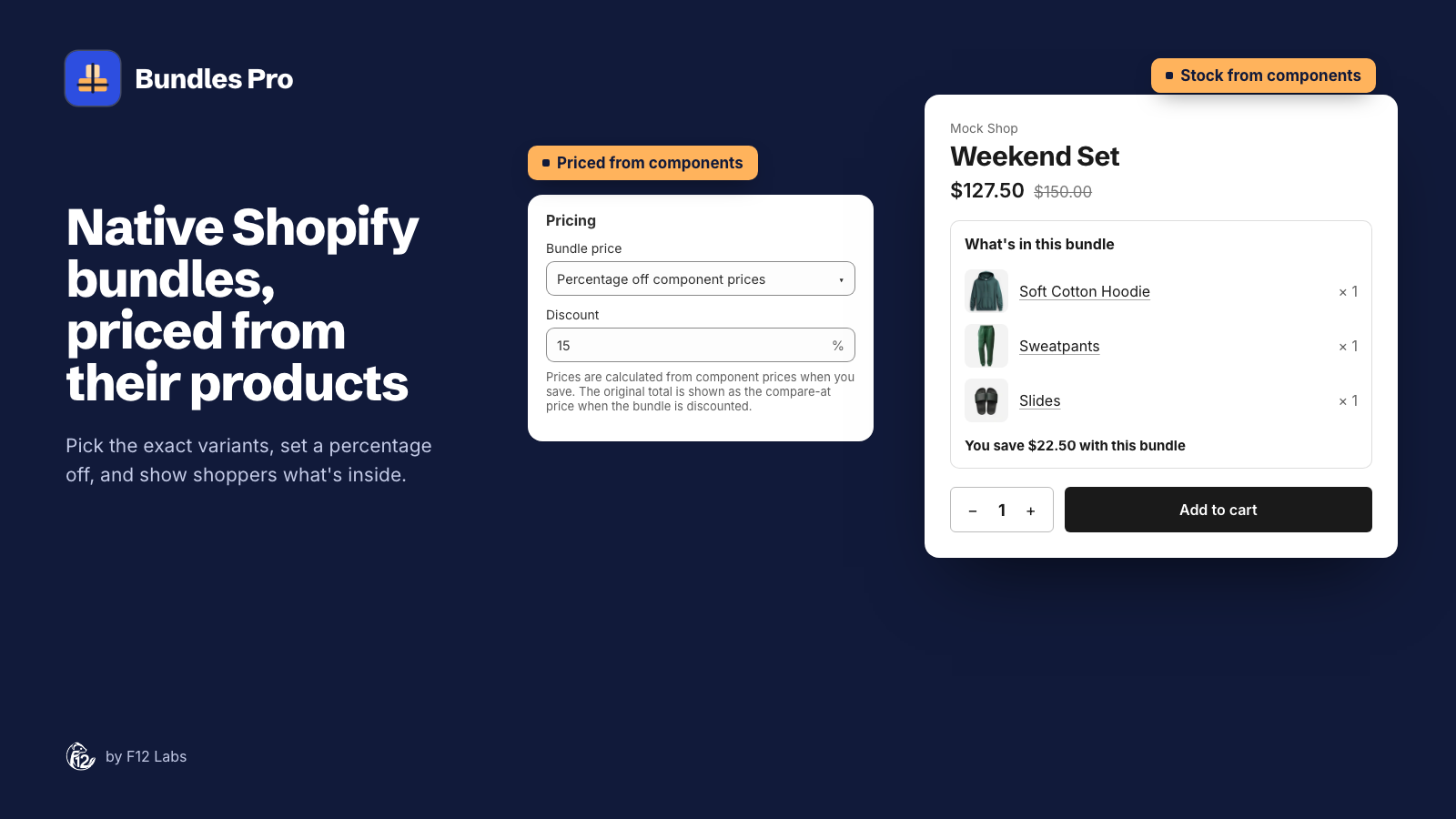
Your hoodie goes up from $65 to $75. You update it in Shopify, check the product page, and move on. A week later you notice the Weekend Set, the hoodie with sweatpants and slides, still sells for $127.50: 15% off a total that no longer exists. Against the new $160 total it's 20% off, not 15%, and it's been that way on every order since.
Nothing broke. That's how Shopify bundles work. Here's why, and how to keep bundle prices in step without checking every bundle by hand.
A bundle has its own price
A Shopify bundle is a product made of other products. Shopify works out its stock from them: "The product with the lowest inventory level determines how many bundles can be sold." (Eligibility and considerations for product bundles)
The price is different. Each bundle variant has a price of its own, set when the bundle is made, and Shopify doesn't recalculate it. Shopify's help center says so plainly for its own Shopify Bundles app: "When the price of one of the bundled products updates, either manually or from price imports, the bundle price doesn't update." And: "You need to manually update the bundle price in your Shopify admin." (Shopify Bundles)
So stock follows the products inside. Price doesn't.
That's often what you want. A bundle at a round $99 shouldn't drift to $101.37 because the slides went up. But if the bundle is meant to be "the products, 15% off", every price change leaves it behind.
Why it's easy to miss
- Nothing warns you. Changing a product's price doesn't mention the bundles it's in.
- You can't fix it in bulk. "Bundles don't support import, export, or bulk editing capabilities." (Eligibility and considerations) A price CSV that updates your products leaves the bundles where they were.
- Every variant is priced separately. A bundle with three hoodie sizes and four sweatpants sizes has 12 variants. If the sizes are priced differently, each needs its own new price.
- The compare-at price goes stale too. If the bundle shows the old total struck through, the saving it claims is wrong.
Checking after a price change
- Find the bundles the product is in. Shopify's product page doesn't list them by default. In the Shopify Bundles app you'd open each bundle; some bundle apps add a card to the product page.
- Work out the new price for each bundle variant: the sum of what's inside, times the quantity of each, less your discount.
- Update the compare-at price to the new total, if you show one.
- Check the saving on the storefront, on a bundle variant with the changed product.
For one bundle and one price change, that's ten minutes. For a seasonal price rise across a catalog, it's the kind of job that gets skipped.
Price bundles by rule, not by number
The fix is to decide what each bundle's price means, and keep that decision somewhere you can apply it again:
| Rule | After a product's price changes |
|---|---|
| The total of what's inside | Recalculate. The bundle is a convenience, not a deal |
| A percentage off the total | Recalculate. The saving stays 15% |
| One fixed price | Leave it, unless the saving gets too thin or goes negative |
A fixed price is the only one that doesn't need updating, and it's the one where the saving changes underneath you. Write down which rule each bundle uses. When you change a price, you know which bundles to redo.
One more case: Shopify says that if "a component's SKU changes, then you need to delete and recreate the entire bundle" (Eligibility and considerations). Plan SKU changes with that in mind.
How Bundles Pro does it
Bundles Pro makes native Shopify bundles, so the bundle keeps its own price, as above. What changes is that the rule is saved with the bundle:
- Pick the rule once: Sum of component prices, Percentage off component prices or Fixed price. Bundles Pro prices every bundle variant from the exact variants inside it, and sets the total as the compare-at price when there's a saving.
- Reprice with Save. After a product's price changes, open the bundle in Bundles Pro and click Save. Every variant is repriced from today's prices, and the compare-at price with it.
- See which bundles to open. The Included in bundles card on a product's page in Shopify lists the live bundles it's in, each with an Edit button.
- From your ERP or PIM, on the Pro plan, an API update that includes the bundle's pricing reprices it the same way.
Bundles Pro doesn't reprice on its own when a product's price changes, so it's still a step after each price change; it's one click per bundle instead of a spreadsheet.
Bundle variants and pricing covers the pricing modes with a worked example, and Bundles on the Shopify product page covers the Included in bundles card.
Shopify behavior checked on 5 November 2026 against Shopify's help center (Shopify Bundles, Eligibility and considerations for product bundles). If Shopify starts updating bundle prices on its own, we'll update this post.