 F12 Labs
 Bundles Pro
Bundles Pro documentation / Build bundles
Bundle variants and pricing
How Bundles Pro turns the variants you pick into bundle variants, why two picks can become four, the 250-variant and three-option limits, renamed options, the three pricing modes, and how to update a bundle's price after a product's price changes.
A Bundles Pro bundle is a Shopify product, and like any product it has variants. Each bundle variant is one combination of the products inside: the hoodie in M, the sweatpants in L and the slides in 42. Shoppers pick the combination on the bundle's product page, and Shopify sells it as one line with the exact variants inside.
This page covers how those variants are made from your picks, the limits, and how each variant is priced.
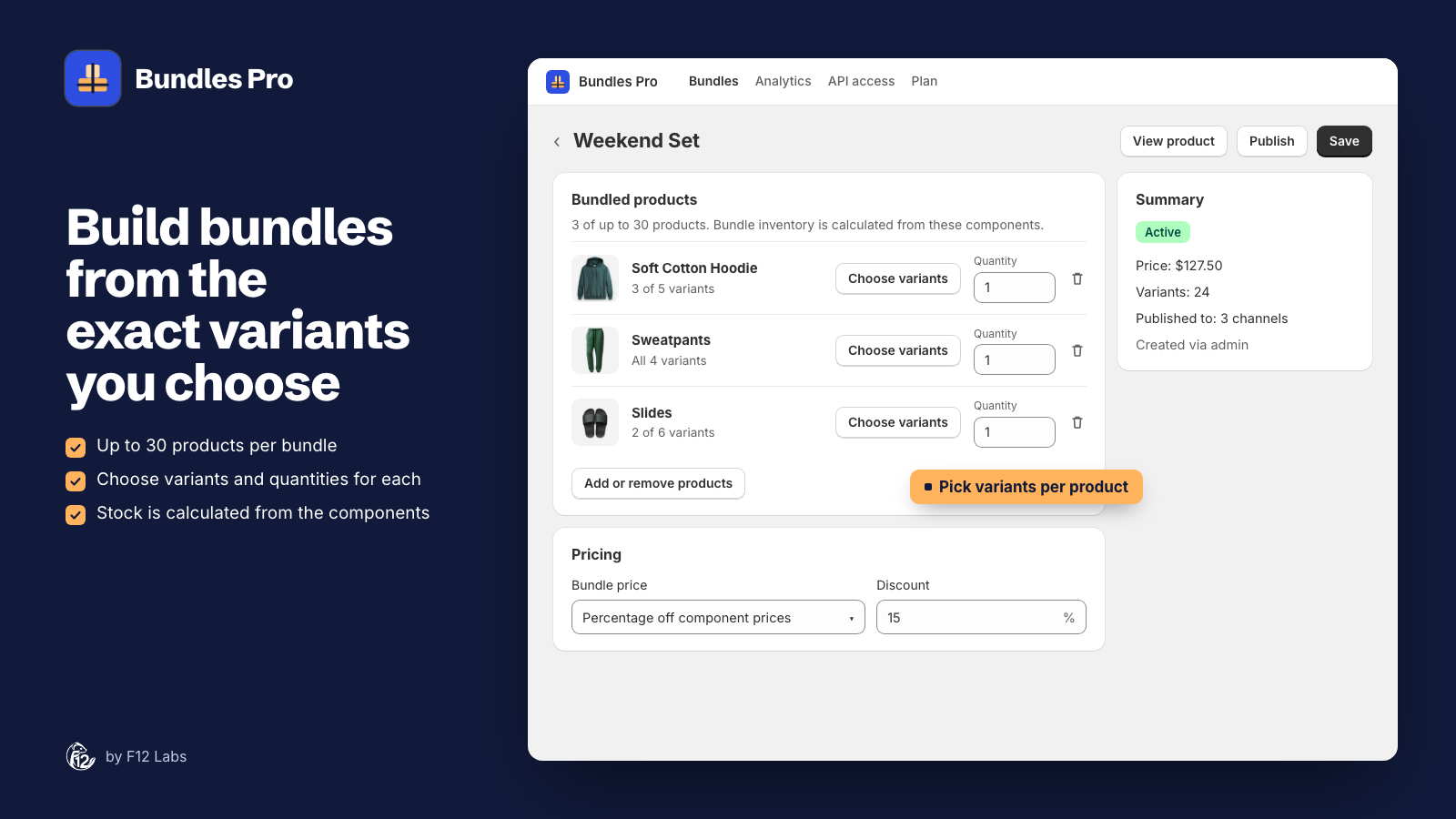
Choosing variants
Under Bundled products, each product shows how many of its variants are in the bundle: All 4 variants or 3 of 5 variants.
- Leave it on all variants and the bundle offers every size and color of that product.
- Choose variants opens the product's variants. Tick the ones that go in the bundle and click Select.
- Quantity is how many of the product are in one bundle, from 1 to 2,000. Two pairs of socks is one product with quantity 2.
The number of bundle variants is the number of picks for each product, multiplied together. The Weekend Set above has 3 hoodie sizes × 4 sweatpants sizes × 2 slide sizes = 24 variants. The Summary on the bundle's page shows the count after you save.
Why two picks can become four
Shopify builds bundles from option values, not from single variants. For each product, the bundle includes the values you picked for each option, and then every combination of them.
Say a T-shirt comes in Red and Blue, sizes S and M, and you pick only Red / S and Blue / M. The values picked are Red, Blue, S and M, so the bundle offers:
| You picked | The bundle offers |
|---|---|
| Red / S | Red / S |
| Blue / M | Red / M |
| Blue / S | |
| Blue / M |
When this happens, Bundles Pro tells you after saving, in a Check the variant selection banner: "T-shirt: the 2 selected variants expand to 4 because bundles select option values, not individual variants."
What to do about it:
- If the extra combinations are fine, leave it. They're real variants of the T-shirt, priced and stocked like the others.
- If they aren't, pick whole rows or columns: all sizes of Red, or size M in every color. Then nothing expands.
- If you need exactly two variants, make two bundles, one per variant.
Option names
Each product keeps its own options in the bundle. When two products have an option with the same name, Bundles Pro adds the product's title so shoppers can tell them apart. A hoodie and sweatpants that both have Size become two selectors: Soft Cotton Hoodie Size and Sweatpants Size. Matching is not case sensitive, so "Size" and "size" count as the same name.
Bundles Pro doesn't combine matching options into one selector. A bundle where one Size choice sets the size of every product isn't possible in Bundles Pro.
Limits
| Limit | Value | Set by |
|---|---|---|
| Products in a bundle | 30 | Shopify and Bundles Pro |
| Quantity of each product | 1 to 2,000 | Shopify and Bundles Pro |
| Variants in a bundle | 250 | Bundles Pro |
| Options in a bundle | 3 | Shopify |
| Bundles inside a bundle | Not allowed | Shopify |
Shopify documents the 30 products, three options and no nested bundles for bundles that apps create.
Too many variants. If the picks multiply to more than 250, Bundles Pro doesn't save and says "This bundle would have 300 variants (max 250). Select fewer variants." Choose fewer variants on the largest products.
Too many options. Options add up across products. A hoodie with Size and Color plus sweatpants with Size is already three options, so adding slides with a Size option takes the bundle to four and Shopify refuses it. Bundles Pro shows Shopify's message under The bundle couldn't be saved. Leave out a product, or replace one with a product that has fewer options.
Adding a new size later
When a product in a bundle gets a new variant, the bundle doesn't pick it up on its own. Open the bundle in Bundles Pro, click Choose variants on that product, tick the new variant, and click Save.
Pricing
Every bundle variant gets its own price, worked out from the exact variants inside it and their quantities. A bundle with an XL hoodie can cost more than one with an S hoodie if the XL costs more.
Choose how under Pricing → Bundle price:
| Bundle price | Bundle variant price | Compare-at price |
|---|---|---|
| Sum of component prices | The total of the variants inside, × quantities | Removed |
| Percentage off component prices | That total, minus the Discount % (0 to 100) | The total, when the discount is above 0 |
| Fixed price | The amount in Price for every bundle variant, the same for every variant | The total, when it's higher than the fixed price |
Prices are rounded to the cent. The compare-at price is what your theme shows struck through, and what the What's in this bundle block uses for "You save $22.50 with this bundle" (see Storefront blocks).
Worked example
The Weekend Set, one of each, at Percentage off component prices, 15%:
| Inside the variant | Price |
|---|---|
| Soft Cotton Hoodie, M | $70.00 |
| Sweatpants, M | $35.00 |
| Slides, 42 | $45.00 |
| Total | $150.00 |
That variant sells for $127.50, with $150.00 as the compare-at price. If the XL hoodie is $75.00, the variant with it sells for $131.75 and shows $155.00.
At Fixed price, $120.00, every variant sells for $120.00: the M one shows $150.00 struck through and the XL one $155.00.
When a product's price changes
Bundle prices are set when you save the bundle, not when a product's price changes. That's how Shopify bundles work too: Shopify's help center says that when a bundled product's price changes, the bundle price doesn't update (Shopify Bundles).
After changing a product's price:
- Open the product in your Shopify admin. The Included in bundles card lists the bundles it's in (see Bundles on the Shopify product page).
- Click Edit on each bundle to open it in Bundles Pro.
- Click Save. Bundles Pro reprices every variant from the products' current prices.
On the Pro plan, a PATCH through the API reprices the bundle only when the request includes pricing. See Create and update bundles with the API.
Stock
You don't set stock on a bundle. Shopify works it out from the products inside: "The product with the lowest inventory level determines how many bundles can be sold." (Eligibility and considerations for product bundles) Each bundle variant follows its own variants, so the bundle with size M sweatpants sells out when the M sweatpants do, while the L one stays available.
Next steps
- Show shoppers what's inside, and offer the bundle on its products' pages: Storefront blocks.
- Find which bundles a product is in before you change its price: Bundles on the Shopify product page.