 F12 Labs
Managing Shopify bundles from your ERP: why the bundle app needs an API
If your ERP or PIM is where bundles are defined, Shopify needs to receive them automatically. What Shopify's own bundle APIs offer, the ownership rule that decides who can change a bundle, and what to look for in a bundle app that your ERP can create and update bundles through.
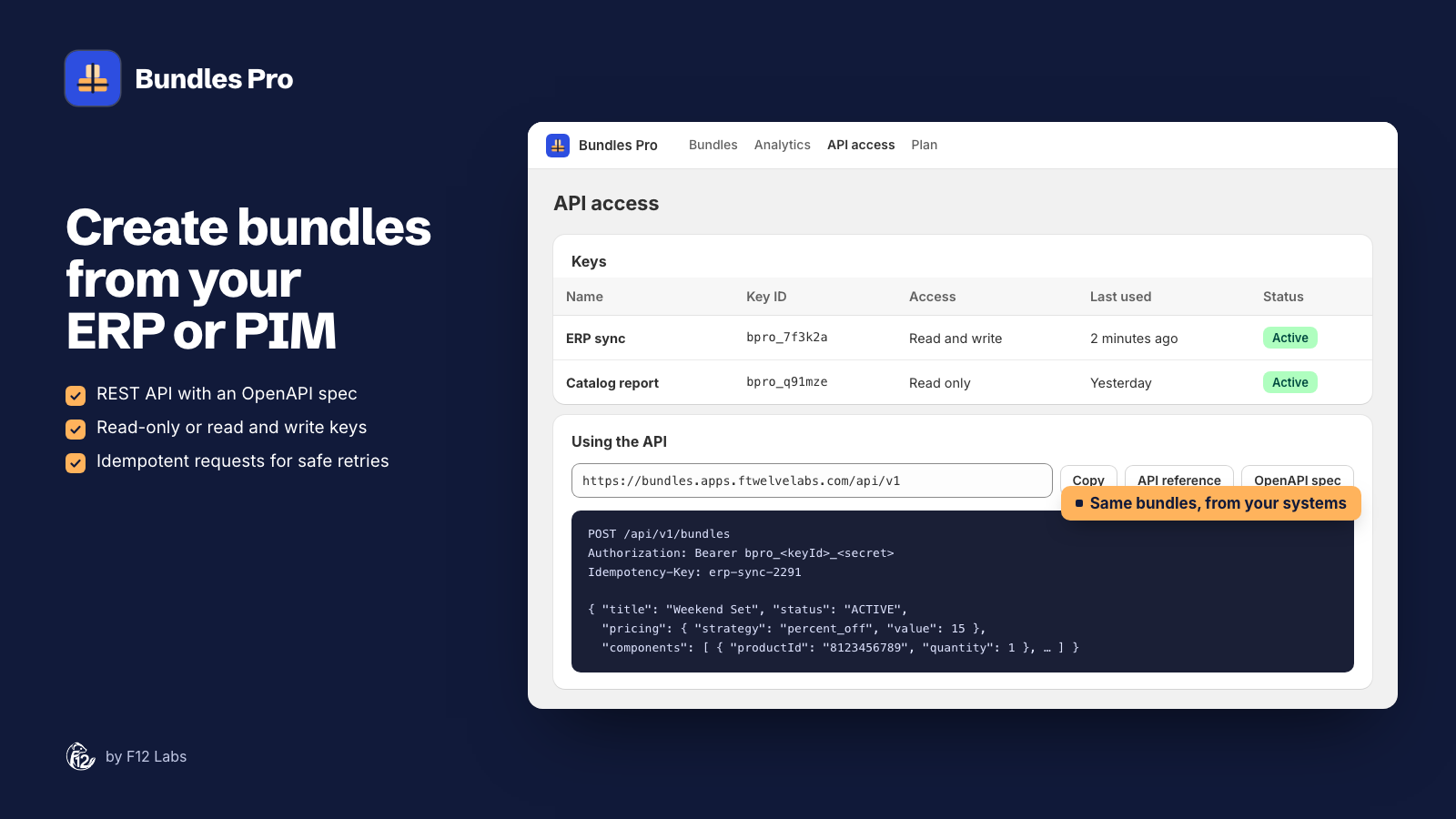
In many businesses the ERP is where products are defined. A new kit gets an item number, a bill of materials and a price there first. The website should follow: when the kit is created, changed or discontinued in the ERP, Shopify should change with it, without someone rebuilding it by hand in an app screen.
For single products that's routine. Bundles are harder, because of one rule in how Shopify bundles work. Here's what Shopify offers natively, where that rule bites, and what a bundle app needs for an ERP to drive it.
What Shopify offers natively
Shopify has bundles built in, and its Admin GraphQL API can create them. There are two kinds (About product bundles):
Fixed bundles. A bundle is a product whose components are other products. Two Admin API mutations build them:
productBundleCreate"Creates a product bundle that groups multiple Product objects together as components", andproductBundleUpdatechanges one. Both need thewrite_productsscope and a shop with the bundles feature, and they run in the background: "The mutation runs asynchronously and returns a ProductBundleOperation object", which you poll until it's done. (productBundleCreate, productBundleUpdate)productVariantRelationshipBulkUpdatesets components per variant: it "Creates new bundles, updates component quantities in existing bundles, and removes bundle components". (productVariantRelationshipBulkUpdate)
Shopify then handles stock (the parent's quantity is "the minimum of the component's inventory quantities"), groups the lines in cart and checkout, and puts the components on the order. (Start building bundles)
Customized bundles use a Cart Transform Function. It changes the cart, not the catalog: it can expand one cart line into its components, merge several lines into one bundle line, or (on Shopify Plus and development stores only) override a line's price, title and image. A store can have "a maximum of one cart transform function per app". (Cart Transform API) It's for build-your-own boxes chosen by the shopper, not for publishing a fixed catalog of kits from an ERP.
Some limits apply to every bundle: up to 30 components and three options per fixed bundle, no bundles inside bundles (Add a product fixed bundle), and no subscriptions, pre-orders or try-before-you-buy (Eligibility and considerations).
The rule that decides who can change a bundle
Shopify's developer docs:
"After an app has assigned components to a bundle, only that app can manage the components of the bundle."
A bundle belongs to the app that built it. Its title, images and description are ordinary product fields, but its contents can only be changed by that one app. That leaves an ERP with two native routes, each with a catch:
Build bundles in a bundle app, then sync from the ERP. The ERP's connector is a different app, so it can't change those bundles' contents. Shopify's own Bundles app doesn't help here either: "Bundles don't support import, export, or bulk editing capabilities." (Eligibility and considerations) Every change to a kit is retyped in the app.
Have the ERP connector create the bundles itself, with productBundleCreate. This works, if your connector (or a custom app you build) does it. But now the connector owns the bundles. Your team can't open them in a bundle app's screens to fix a variant, and a bundle app's storefront and admin features don't know about them. You also build everything around the bundle yourself: polling operations, pricing each bundle variant (Shopify prices a fixed bundle from "the parent variant", so someone has to set it), and keeping prices right when component prices change. Shopify Bundles has the same pricing gap: "the bundle price doesn't update. You need to manually update the bundle price." (Shopify Bundles)
So the practical answer is a bundle app that is also the API: the ERP talks to the bundle app, the bundle app owns the bundles, and your team edits the same bundles in its screens.
What to look for in a bundle app
Bundle apps are usually built around their own admin screens. If an ERP or PIM will drive your bundles, check the app's public documentation for:
- A documented API that creates bundles and changes their contents, not just reads them. An OpenAPI spec saves your integrator time.
- Keys you control: created and revoked by you, read-only or read and write, scoped to one store.
- Safe retries. ERP syncs time out and retry. An idempotency key stops a retry from creating a second bundle.
- Honest handling of Shopify's background build. Creates and content changes are asynchronous in Shopify, so the API should return an operation you can check, not pretend it finished.
- Pricing rules, not just prices, so a bundle can be the total of its products, a percentage off, or a fixed price, worked out from the components.
- The same bundles in the admin. Bundles made by the API should show and be editable in the app, so staff aren't locked out of what the ERP made.
- A clear answer on deleting. Find out how a bundle is retired or removed through the API, before you need it.
How Bundles Pro does it
Bundles Pro creates native Shopify fixed bundles and, on the Pro plan, has a REST API that runs every change through the app, so Shopify accepts it as the bundle's owner.
- Create:
POST /bundleswith a title, status, pricing, the sales channels to publish to, and up to 30 products, each with a quantity and, if you like, the exact variants. Send anIdempotency-Keyand a retried request returns the first result instead of a duplicate. - Check: the create returns an operation;
GET /operations/{id}says when Shopify has built it and gives you the bundle's product ID to store in your ERP. - Update:
PATCH /bundles/{id}changes title, status, price and channels at once, or replaces the products (as a new operation). - Price from components:
sum,percent_offorfixed_price, with the products' total as the compare-at price. Re-sendpricingwhen your ERP changes a product's price, and the bundle is repriced from the current prices. - Keys: created on API access in the app, read-only or read and write, shown once and stored only as a fingerprint, revocable at any time. 120 requests a minute per key.
- Reference: an interactive API reference and an OpenAPI 3.1 spec.
Bundles from the API show in the app next to the ones staff made, marked API, and appear in the product page cards and the storefront blocks like any other.
What it doesn't do: there's no delete endpoint. Your ERP can retire a bundle by setting it to DRAFT and removing its sales channels; deleting it for good is done on the bundle's product in Shopify. There's no outgoing webhook either: your integration checks the operation.
Setting it up
- Install Bundles Pro and move to the Pro plan.
- On API access, generate a Read and write key named after the integration, and copy the token into your ERP connector's secrets.
- Map each ERP kit to a bundle: product IDs for the components, a quantity for each, and a pricing rule.
- Create, poll the operation, and store the returned product ID against the ERP kit. From then on, send
PATCHrequests for changes.
Create and update bundles with the API has the endpoints, payloads, errors and a sync pattern.
Before you rely on it
- Bundles you already have stay where they are. Bundles made in Shopify Bundles or another app belong to that app; Bundles Pro can't change their contents. Create new ones through Bundles Pro.
- Prices follow saves, not product changes. Re-send
pricing(or save in the app) when a component's price changes. - Poll every operation. That's when Bundles Pro applies the status, price and channels you asked for.
- Store eligibility is Shopify's. Shopify's bundle rules apply: no
checkout.liquidcustomizations, no subscriptions on bundles.
Shopify behavior checked on 20 October 2026 against Shopify's developer docs (About product bundles, Start building bundles, Add a product fixed bundle, productBundleCreate, productVariantRelationshipBulkUpdate, Cart Transform API) and help center (Shopify Bundles, Eligibility and considerations for product bundles). If Shopify adds bundle import or lets other apps manage a bundle's components, we'll update this post.