 F12 Labs
Tiered pricing on Shopify for regular shoppers, not just B2B
Shopify's quantity price breaks only reach logged-in B2B customers. Here's how to offer "buy more, save more" pricing to every shopper, what the native options can and can't do, and how to show the tiers on the product page.
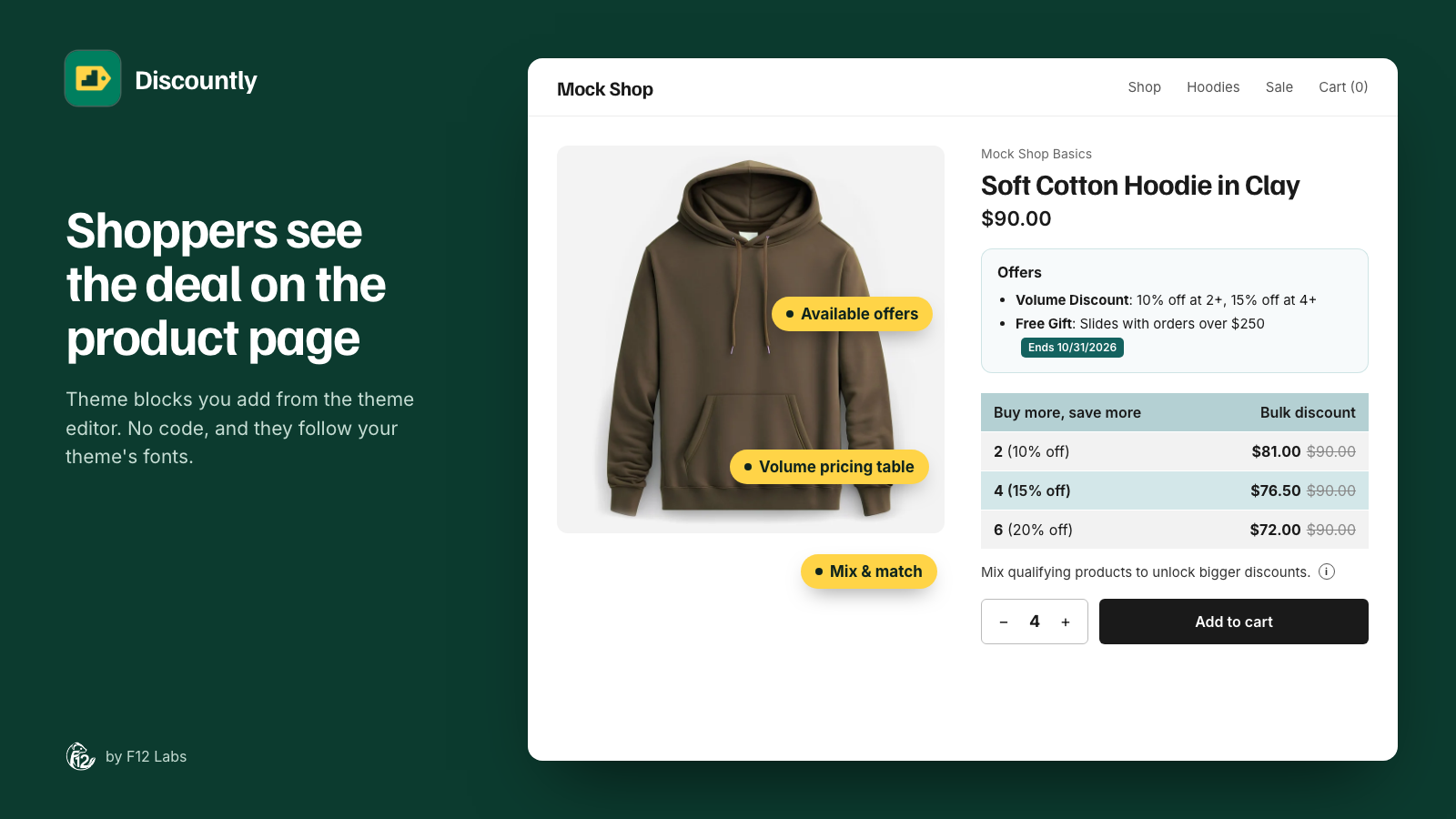
"Buy 3, save 10%. Buy 6, save 15%." Tiered pricing is one of the oldest ways to raise order value, and shoppers understand it at a glance. It works for socks, coffee, seeds, supplements, anything people buy more than one of.
Shopify does have tiered pricing built in. It's called quantity price breaks, and it's on every plan from Basic up. The catch is who sees it: it's a B2B feature, so your regular shoppers never get those prices.
Here's what Shopify offers, where it stops, and how to give every shopper volume pricing.
What Shopify offers: quantity price breaks in B2B
Shopify B2B lets you set volume pricing on products in a B2B catalog: a lower price per unit once a buyer orders a set quantity. You can add up to 10 price breaks per product, and they apply to each variant.
B2B is available on the Basic, Grow, Advanced and Plus plans, and quantity price breaks are included on all four. On Basic, Grow and Advanced you can have up to 3 active B2B catalogs.
But catalogs are assigned to companies and their locations, and Shopify is clear about who sees the prices: "only logged-in B2B customers can access B2B-specific pricing." A shopper who arrives from an ad, or a regular customer who isn't set up as a company, pays the normal price whatever quantity they buy.
That's the right design for wholesale. It doesn't help if you want a shopper buying six candles to pay less per candle than one buying one.
Option 1: One "Amount off products" discount per tier
Shopify's Amount off products discount can require a minimum quantity of items. So you can build tiers out of several discounts:
- "Buy 3, 10% off": minimum quantity 3, 10% off the product.
- "Buy 6, 15% off": minimum quantity 6, 15% off.
What goes wrong:
- Several discounts have to cooperate. A cart of 6 qualifies for both. You need to set combinations so the shopper gets the 15% and not 10% on top of it, and check it again whenever you add another promotion.
- The minimum counts across everything the discount covers. If one discount covers a whole collection, 3 different products reach the minimum together. Sometimes that's what you want, sometimes it isn't, and you can't choose per tier.
- Nothing shows on the product page. Shoppers see the tiers only if you write them into the description, and keep the text in step with the discounts by hand.
- Every tier is another discount to manage, schedule and end.
Good for: one product line with two tiers, for a short campaign.
Option 2: Separate pack variants
Some stores skip discounts and sell packs: "Single", "3-pack", "6-pack", each a variant with its own price.
It's simple, and the price is right on the product page. But inventory gets awkward (a 6-pack is six of the same stock), shoppers can't mix colors or scents within a pack, and a shopper who adds the single variant six times pays full price six times.
Good for: products that are genuinely sold in packs.
Option 3: An app with real volume tiers
A volume pricing app gives you one discount with all its tiers, worked out per cart. Before you choose one, check:
- Prices are set by Shopify at checkout. Look for apps built on Shopify Functions. Avoid ones that change product prices or send shoppers through draft orders to apply the discount.
- One discount, many tiers, so the right tier always wins without juggling combinations.
- Mix and match is your choice: whether 2 red and 1 blue count as 3, per discount.
- The tiers show on the product page, next to Add to cart, without editing theme code.
- You decide who gets it: everyone, or only logged-in or tagged customers.
How Discountly does it
Discountly's Volume pricing discount is built for exactly this, and it's on the Free plan.
- Tiers in one discount. Add a tier for each minimum quantity, with a percentage off or an amount off each unit. The highest tier the cart reaches applies.
- "At or above" or "exact" tiers. By default a tier applies from its quantity up until the next tier. Choose Exact tier quantity only when a price should apply to that exact quantity.
- Mix & match. Turn on Combine quantities across all matching products and different products count together toward a tier. A Mix & Match product page block tells shoppers so, with a link to the products that count.
- A pricing table on the product page. The Volume Pricing Table block lists the tiers next to Add to cart, highlights the one the shopper's quantity reaches, and can update the price to the per-unit price.
- Everyone or some. Offer it to all shoppers, or limit it to logged-in customers, customers with a tag, specific customers, or a segment. Regulars and wholesale buyers can have different tiers.
- Shopify does the math. Discountly runs on Shopify Functions, so the discount is calculated by Shopify in the cart and at checkout.
Setting up a volume discount:
- In Discountly, click Create discount and choose Volume pricing.
- Give it a title. Shoppers see it in the cart and at checkout.
- Under Discount logic, add your tiers, for example 3+ at 10% and 6+ at 15%.
- Under Who it applies to, choose the products: all, a collection, tags, or other criteria.
- Click Save rule.
- In Store setup at the bottom of the Discounts page, click Add to product page next to Volume pricing table, and save in the theme editor.
The getting started guide walks through it, and Store setup and theme blocks covers the product page blocks.
Before you launch tiered pricing
- Price the top tier against your margin, after shipping. The biggest tier is the one bulk buyers will use.
- Decide whether tiers stack with sales. A 15% tier on an item already 30% off may be more than you meant. Decide per discount.
- Show the tiers where people choose a quantity. A table next to Add to cart does more than a line in the description.
- Keep the number of tiers small. Three tiers are easy to read. Seven aren't.
- Test on a phone: add 2, 3, 6 and 7 items, check the cart price at each step, and check the table on the product page.
Shopify behavior checked on 12 October 2026 against Shopify's help center: Plan features in B2B, Quantity rules and volume pricing in B2B, Sign-in and customer accounts in B2B and Amount off discounts. Shopify adds features regularly; if quantity price breaks come to every shopper, we'll update this post.