 F12 Labs
Mix and match quantity discounts on Shopify: any 6 from a collection
"Any 3 candles for 10% off, any 6 for 15%": a quantity discount where different products and variants count together. What Shopify's discounts, Buy X get Y and B2B price breaks do with mixed carts, where each stops, and how to set up tiered mix and match.
You sell candles in twelve scents. You'd like "any 3 for 10% off, any 6 for 15% off". A customer who picks vanilla, cedar and fig should get the same deal as one who buys three vanilla. Nobody wants six of one scent.
That's a mix and match quantity discount: the quantity is counted across a group of products, not product by product. It's how build-a-box offers, "any 6 for $X" and multi-scent or multi-color deals work, and it's also what you want when a customer buys a T-shirt in two sizes.
Here's what Shopify does with a mixed cart, where each option stops, and what to look for in a fix.
What Shopify does: one tier per discount, counted across the products
Shopify's Amount off products discount can require a Minimum quantity of items: customers have to "order a minimum number of products to qualify for the discount." If the discount covers specific products or collections, "only these items contribute to the minimum quantity amount." (Amount off discounts)
So the quantity counts across everything the discount covers. A discount on your Candles collection with a minimum of 3 is a mix and match discount with one tier, and it works natively.
The trouble starts at the second tier.
Option 1: One discount per tier
For "any 3 for 10%, any 6 for 15%", you make two discounts on the same collection: minimum 3 at 10%, minimum 6 at 15%. A cart of 6 qualifies for both. If they don't combine, Shopify sorts it out: "the best discount for the customer's cart is always applied." (Combining discounts)
Where it breaks:
- Every tier is another discount. Three tiers is three discounts to create, schedule, end and keep identical in what they cover. Add a scent to one and forget the others, and the 6-candle price skips it.
- Combinations get harder. The tiers mustn't stack on each other, but each one still has to combine (or not) with your free shipping offer and next week's sitewide code. That's a setting on every tier.
- Nothing shows on the product page. Shoppers find out about the tiers in the cart, if at all, unless you write them into product descriptions and keep that text in step by hand.
- No packs. A minimum is "at least". There's no "exactly 6 for 15%" box price where 7 or 8 get nothing extra.
Good for: one tier, or a short campaign with two.
Option 2: Buy X get Y across a collection
"Buy any 3, get 1 free" with Buy X get Y also mixes: qualifying items "can be set by product or collection" and the customer buys a minimum quantity of them. (Buy X get Y discounts)
But Shopify is clear about the free item: "Customers must add all items to their cart manually," and the get item "is never automatically added to the cart." A customer who adds 3 candles and checks out without a fourth gets nothing, and may not know why.
Good for: offers where the free item is obvious and customers expect to pick it.
Option 3: B2B volume pricing
Shopify B2B has real quantity price breaks: "additional price breaks to customers when they purchase larger quantities of a product in a single order," up to 10 per product. But they don't mix, even within one product: "Customers need to meet the required quantity for each variant to qualify for the price break." (Setting up quantity rules and volume pricing in B2B)
Three medium and three large T-shirts are two quantities of 3, not one of 6. And B2B pricing is for B2B customers and their catalogs, not every shopper. We covered that in tiered pricing without B2B.
Good for: wholesale buyers ordering one variant in bulk.
What to look for in a fix
- Mix and match is a choice per discount. "Any 6 from the collection" should mix. A pack price on one product may not.
- All the tiers in one discount, so the highest tier the cart reaches always wins and there's one thing to schedule and one set of combinations.
- The tier applies to every item in the group. A mixed cart of 6 gets 15% off all 6, not just on the items that happen to share a variant.
- Exact quantities when you want them, for box and pack offers.
- Free and sale items handled. A free gift in the cart shouldn't count toward the tier, and if sale items don't get the discount, they shouldn't count either.
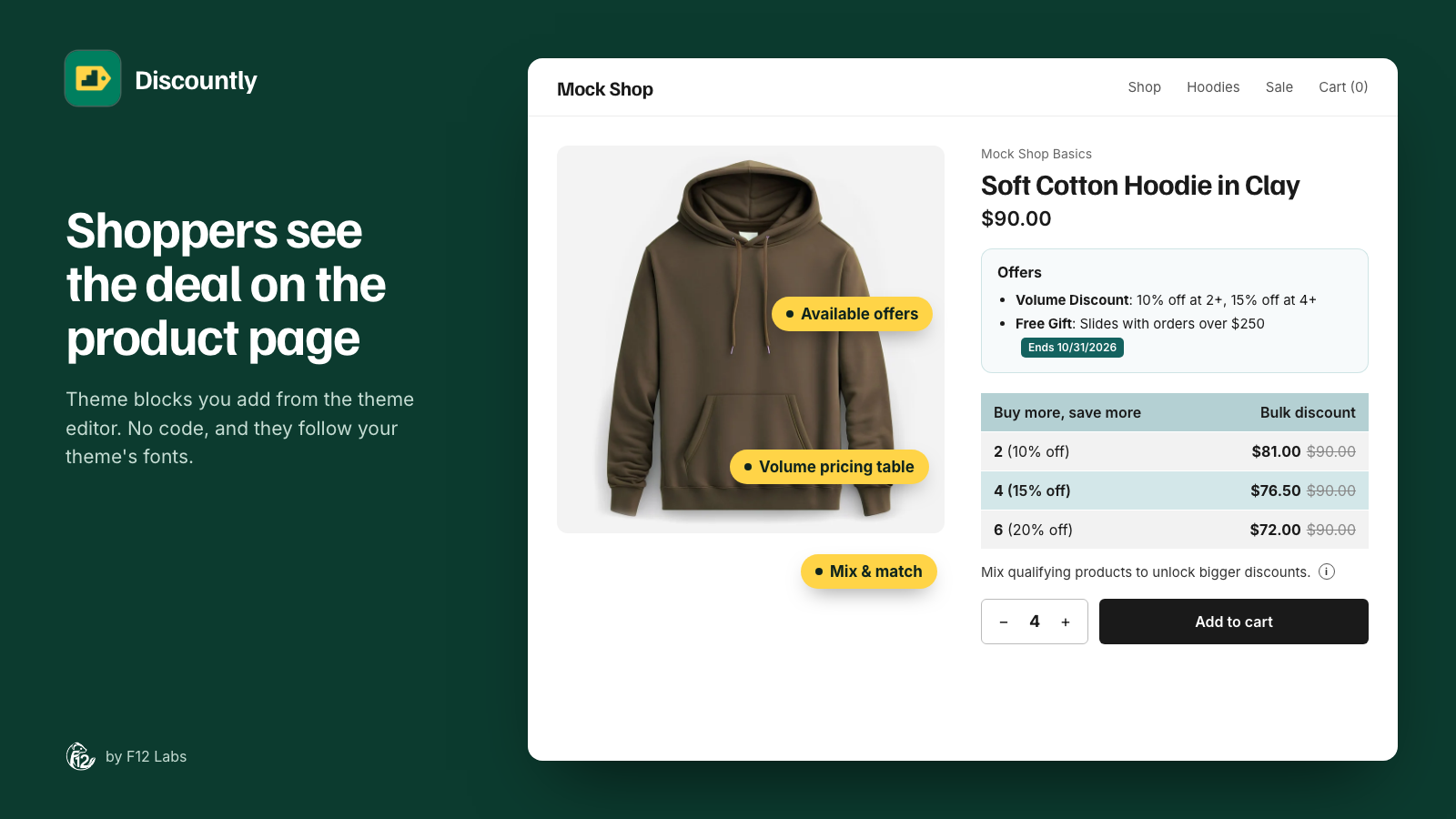
- Shoppers told on the product page that quantities combine. Nobody guesses it.
- Calculated by Shopify at checkout, through Shopify Functions, so the cart, checkout and order agree.
How Discountly does it
A Discountly Volume pricing discount holds all its tiers, and each logic block in it has a setting: Combine quantities across all matching products. With it ticked, Discountly adds up the quantity of every cart line the logic block covers and gives all of them the tier the total reaches. Without it, each cart line (one variant) counts on its own.
For candles at $20, with tiers at 3 for 10% off and 6 for 15% off:
| Cart | Each line on its own | Combined |
|---|---|---|
| 3 vanilla | 10% off, $18 each | 10% off, $18 each |
| 1 vanilla, 1 cedar, 1 fig | No discount | 10% off, $18 each |
| 2 of each of 3 scents | No discount | 15% off, $17 each |
| 4 vanilla, 2 cedar | 10% off the vanilla only | 15% off all 6 |
- Only what the logic block covers counts. Choose the products by collection, tag, type, vendor or metafield. Candles count, matches in the same cart don't.
- Exact quantities for packs. With Exact tier quantity only, the combined total has to equal a tier: a box of exactly 6 gets 15%, 7 gets nothing extra.
- Free items never count. Gifts and rewards added by other Discountly discounts are left out of the total.
- Sale items follow your choice. If Items already on sale is Don't apply, sale items don't get the tier and don't count toward it.
- Shoppers are told. The Mix & match product page block shows a line such as "Mix qualifying products to unlock bigger discounts." with an info window, and the volume pricing table lists the tiers.
- Shopify does the math. Discountly runs on Shopify Functions, so the tier is calculated by Shopify in the cart and at checkout.
Volume pricing is on every Discountly plan, including Free.
Setting it up
- In Discountly, click Create discount and choose Volume pricing. Give it a title such as "Any 3 or 6 candles".
- Click Add logic. In The offer, set the tiers: 3 at 10% off, 6 at 15% off.
- In Who it applies to, choose Specific products and add the criterion Collection is in any of "Candles".
- Under Mix & match, tick Combine quantities across all matching products. Click Save, then Save rule.
- In the theme editor, add the Volume Pricing Table and Mix & Match blocks to your product page. Store setup on the Discounts page links straight to it.
- Test it: add three different scents to a cart and check that each is 10% off.
The Volume pricing docs compare carts with and without mix & match, and the Mix & match block docs cover its settings and wording.
Before you rely on it
- The product page blocks need an automatic discount. The table and the Mix & match line only show for automatic volume discounts. A discount code still works in the cart, but shoppers won't see it on the product page.
- Name the range in the block's text. The Mix & match line is the same on every product it shows on. Reword it to say what mixes, such as "Mix any scents: buy 3 or more to save."
- One group per logic block. Everything a logic block covers is one pool. To keep candles and diffusers separate, give each its own logic block.
- Check how it combines. A mix and match tier is a product discount. Set in the discount's combinations whether it can stack with your other offers.
Shopify behavior checked on 21 October 2026 against Shopify's help center: Amount off discounts, Combining discounts, Buy X get Y discounts and Setting up quantity rules and volume pricing in B2B. If Shopify adds tiers to its own discounts, we'll update this post.