 F12 Labs
How long does a Shopify cart last?
A customer fills a cart, comes back a few weeks later, and it's empty. How long Shopify keeps a cart, what Shopify's documentation actually says about the cart cookie and cart expiry, what clears a cart sooner, and how to keep a signed-in customer's cart for as long as they need it.
A customer puts a $400 order together in early November: a jacket, two shirts, boots. They're waiting for payday, or a gift-giving deadline, or just thinking about it. In December they come back, open the cart, and it's empty. They don't remember everything they picked, so they buy the jacket and leave.
How long a Shopify cart lasts decides whether that customer comes back to a full cart or an empty one. Shopify's answer is less clear than you'd expect.
What Shopify documents
There's no single "your cart lasts this long" line for Online Store themes. There are two pieces:
The cart cookie. On your storefront, the browser is linked to its cart by a cookie. Shopify's cookie list has cart, "Contains information related to the user's cart", with a duration of 91 days. That's how long the browser keeps the link, not a promise that the cart behind it is still there.
The cart itself. Shopify's developer docs for carts say: "A cart expires within 30 days of its last update. Each change to the cart, such as adding a line or updating the buyer identity, restarts the expiry window." And: "Shopify automatically deletes the cart when the customer completes their checkout." (Shopify: Cart) That page is written for headless storefronts using the Storefront API. Shopify doesn't say whether a theme's cart follows exactly the same rule.
So a fair reading: a cart nobody touches for about a month can't be relied on, even though the cookie pointing to it lasts longer. A cart that keeps changing keeps living.
What clears a cart sooner
The 30 days assume the same browser keeps its cookie. Plenty of things break that first:
- Another device or browser. The cart belongs to the browser, so the laptop never sees the phone's cart. See why carts don't follow customers between devices.
- Clearing cookies or site data, which some people do routinely and some browsers do for them.
- Private or incognito windows, which throw cookies away when they close.
- In-app browsers. A customer who taps your Instagram ad shops inside Instagram's browser; next time they type your address into Safari, that's a different browser with a different cart.
- Signing in on another device. Shopify's customer accounts keep orders, addresses and profile details, not the cart. See what happens to a cart when a customer signs in.
Why you won't see these carts in Shopify
An expired cart doesn't show up anywhere in your admin. Shopify's abandoned checkouts only cover checkouts: "a checkout process that remains incomplete, even though the customer has provided their email information" (Shopify: Abandoned checkouts). A cart that never reached checkout isn't on that list, and the same page notes that abandoned checkouts "older than three months are automatically deleted". Abandoned carts that never reach checkout goes into what you can see instead.
So the long-consideration shopper, the one who builds a big cart and comes back weeks later, is exactly the one whose cart you can't see and can't count on.
What you can do
Tell customers to use a wishlist. It saves products to the account, but many wishlists don't keep the variant or quantity, and a wishlist isn't a cart: they still have to add everything back.
Send cart reminders sooner. Email flows from your marketing tool shorten the gap, but only for shoppers you can identify, and they don't refill the cart.
Keep the cart on the customer, not the browser. For signed-in customers, the cart can be stored on the customer record in Shopify, which has no 30-day window and no cookie to lose. That's what CartSync Pro does.
How CartSync Pro keeps a signed-in customer's cart
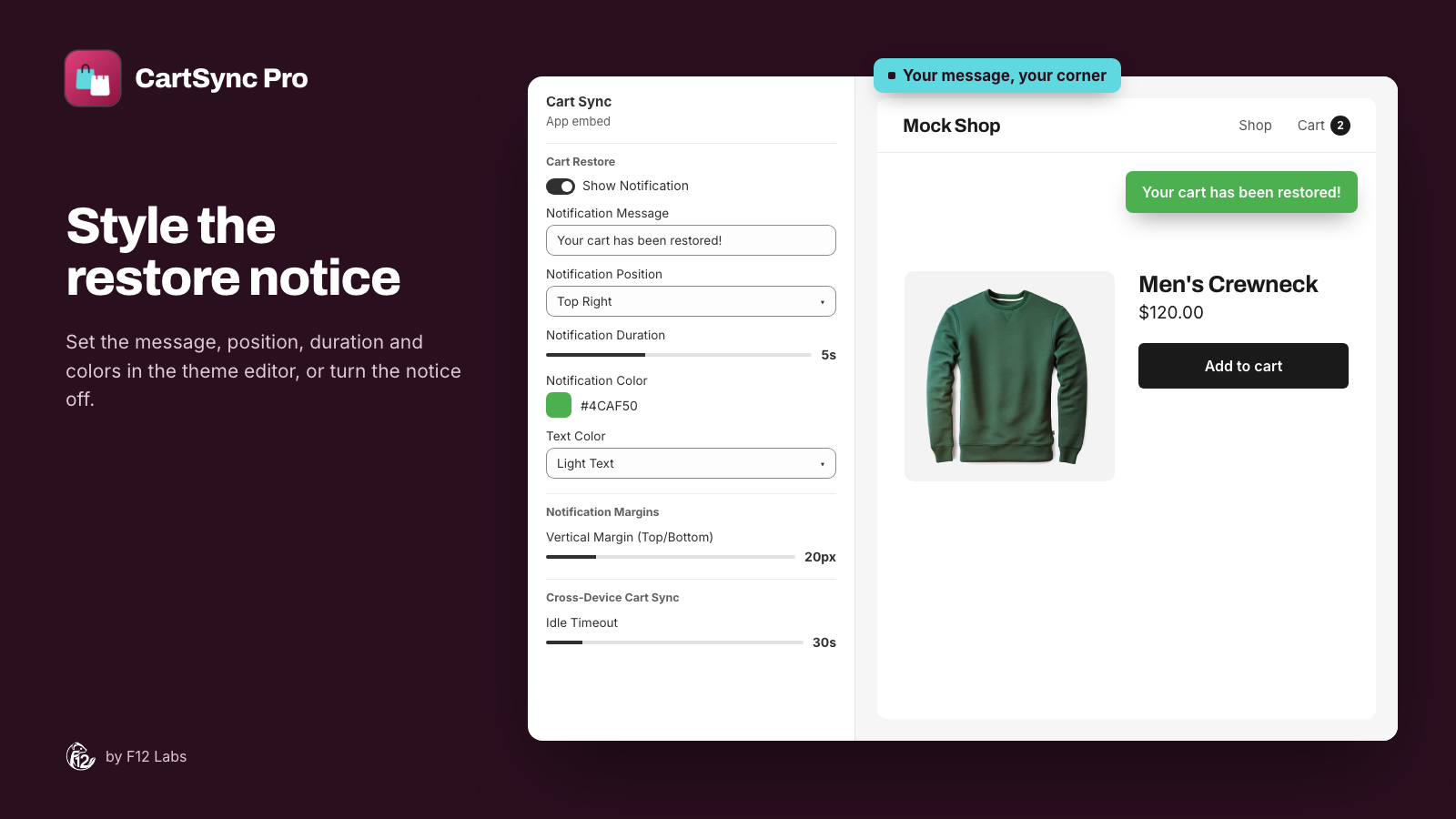
Every time a signed-in customer's cart changes, CartSync Pro saves its products and quantities to the customer in Shopify (a customer metafield). When the customer next opens your store signed in, on any device, in any browser, any number of weeks later, the saved cart is put back and they see a short notice: Your cart has been restored! by default. You can change the message, its position, colors and how long it shows in the theme editor, or turn it off.
- No expiry. The saved cart stays until the customer changes it, empties it, or places an order. CartSync Pro doesn't time it out.
- Every device. It doesn't depend on a cookie, so a new browser, a cleared cache or a phone picks it up as soon as the customer signs in.
- Sold-out items are left out. If something sold out while the cart waited, it isn't added, and the notice says how many items couldn't be restored.
- You can see what's waiting. In CartSync Pro's Insights, Waiting in saved carts shows the value of every open saved cart by age: 0–7 days, 8–30 days and 30+ days. The 30+ group is the carts a browser-only cart would probably have lost. See Waiting in saved carts.
To set it up, install CartSync Pro, click Turn on in theme editor on its home page, and save. Getting started has the details. CartSync Pro is free.
Before you rely on it
- Signed-in customers only. A guest's cart lives in their browser, with Shopify's limits above. Encouraging sign-in is what makes the cart last.
- Products and quantities only. Line item properties, the cart note, cart attributes and discount codes aren't saved. A personalised item comes back without its personalisation.
- Today's price and stock. The saved cart holds products, not prices. Items come back at their current price, which may differ from what the customer saw weeks ago.
- An order empties the whole saved cart. When a signed-in customer places any order, the saved cart is cleared, including items they didn't buy, so they aren't put back next visit. Items still in a browser's cart can be saved again from that browser. See After an order.
- Online Store themes only. It's a theme app embed, so headless storefronts don't run it.
- CartSync Pro keeps its own records. Besides the metafield in Shopify, it stores each saved version of a cart on F12 Labs' servers for cart history and Insights. It's deleted when the customer's data is redacted or 48 hours after you uninstall.
Shopify behavior checked on 26 November 2026 against Shopify's cookie list, shopify.dev's Cart guide, and the help center's Abandoned checkouts and Customer accounts. Shopify changes cookie and cart lifetimes from time to time; we'll update this post when it does.