 F12 Labs
 Discountly
Discountly documentation / Manage discounts
Analytics
Discountly's Analytics page explained. Every tile, the revenue chart, the breakdowns by discount type, by discount and by tier, the orders list, how orders are matched to discounts and what Unattributed means, and why numbers may differ from Shopify's reports.
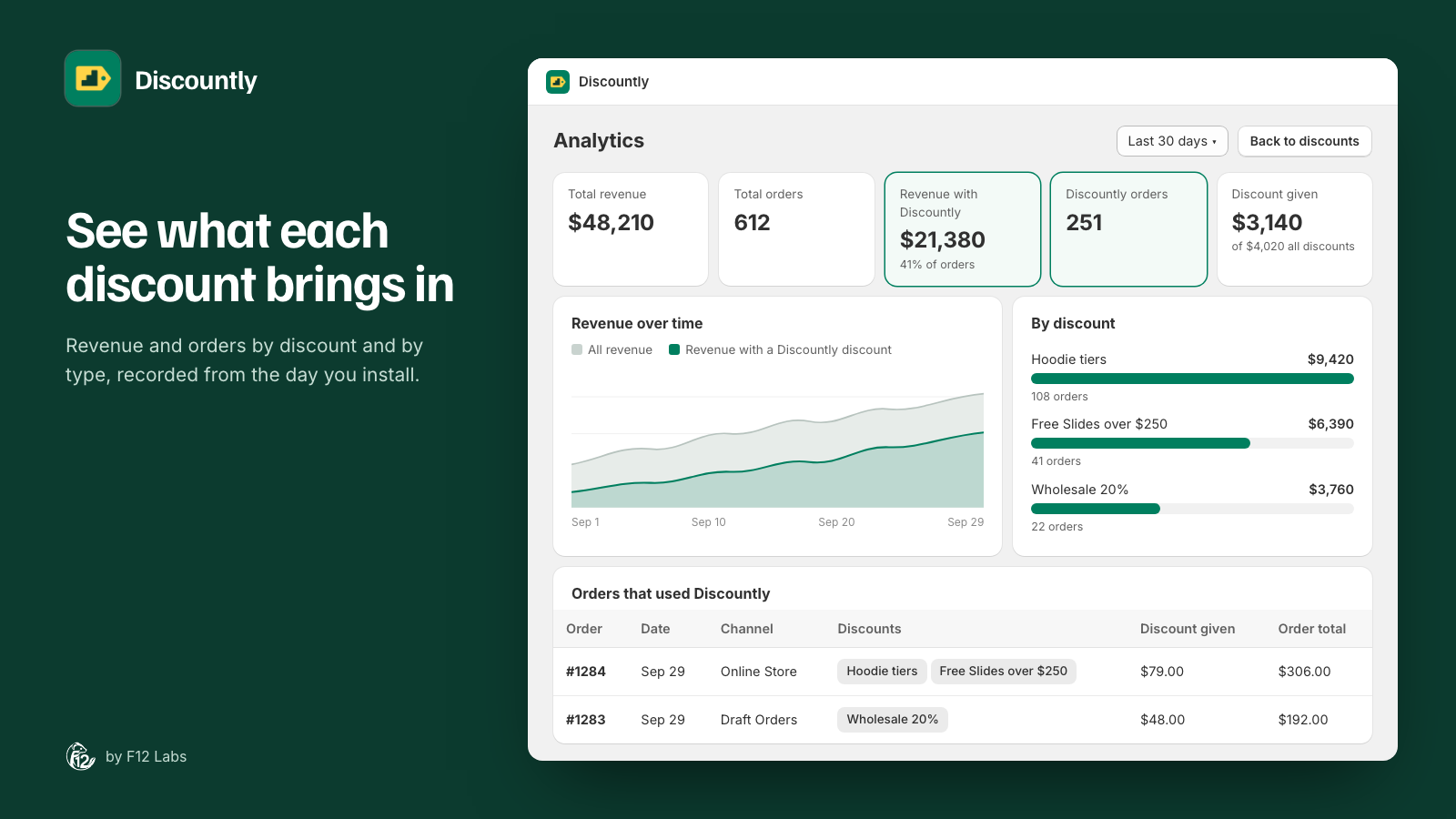
Analytics shows what your Discountly discounts are doing: how many orders used one, what those orders came to, and how much the discounts took off. It's on every plan, and there's nothing to set up. Discountly records orders as they're placed and updated, from the day you install it.
Open it from the Analytics button at the top of Discountly's Discounts page. Anyone with access to Discountly can see it, including the Viewer role.
Two measures
Every part of the page uses the same two numbers:
- Revenue is the total of the orders a discount was on. It answers "what did this discount touch?"
- Discount given is the money the discount actually took off. It answers "what did it cost?"
Revenue from orders that used a discount isn't revenue the discount caused: some customers would have bought anyway. Read the two together, and over time.
Pick a range
Use the menu at the top left: Last 7 days, Last 30 days (the default), Last 90 days or Last 12 months. The 12-month chart is grouped by week; the others by day. Ranges run in whole days, ending today.
Next to it, a note says how many orders Discountly has recorded and since when, for example "1,240 orders recorded since 9/2/2026". Before the first order: "No orders recorded yet. Orders are added as they come in."
The tiles
| Tile | What it counts |
|---|---|
| Total revenue | The total of every order in the range, with or without a discount |
| Total orders | Every order in the range |
| Revenue with Discountly | The total of orders that carried at least one Discountly discount. Underneath: the share of all orders that did, such as "41% of orders" |
| Discountly orders | How many orders carried a Discountly discount |
| Discount given | What Discountly's discounts took off. Underneath: what all discounts took off, Discountly's and any others such as Shopify discount codes, for comparison |
An order's total is the amount the customer was charged, including shipping and tax. Amounts are in your store's currency.
The Discounts page shows the same numbers for the last 30 days, under Revenue & orders, with a link to View full analytics.
Revenue over time
A chart of total revenue for each day (or week), and the part of it from orders with a Discountly discount. Watch the gap between the two: if the Discountly share grows while total revenue stays flat, discounts are going to orders you'd have had anyway.
By discount type
Discount given and revenue for each type: Volume pricing, Product discount, Order discount, Shipping discount, Buy X get Y and Free gift with purchase.
An order with two types of discount, such as a volume tier and free shipping, counts once under each type. So the revenue figures don't add up to total revenue. The bars, which show discount given, do.
By discount
The same, for each discount. Click a discount to open its breakdown:
- Logic (as the customer saw it): each message the discount put on orders, with Applies to (Products or Shipping), Orders and Discount given. For a volume discount that's one row per tier, such as "10% off at 3+" and "15% off at 6+", so you can see which tiers customers actually reach. For Buy X get Y and free gifts it's the reward message.
- The Orders that used Discountly list below narrows to that discount.
Click Clear, or the discount again, to go back to all discounts.
Orders that used Discountly
Every order in the range with a Discountly discount, newest first, with:
- Order: links to the order in Shopify, in a new tab
- Date
- Channel: Online store, Draft order, Point of sale, or the channel's name in Shopify for others
- Discounts: each Discountly discount on the order
- Discount given by Discountly, and the Order total
Use Previous and Next to page through.
How orders are matched to discounts
Shopify's order records which discount messages were applied, such as "15% off at 4+". Discountly uses that to find the discount behind each one.
- Draft orders and free gifts are exact. Discountly marks its own lines, so it knows the discount for certain.
- Storefront orders are matched by message. Shopify doesn't record which Discountly discount a message came from, so Discountly looks for the discount that uses it. Rows matched this way are marked ~, in the By discount bars and the order chips.
- Unclear money goes to Unattributed. If two of your discounts use the same message, an order with that message can't be split between them. Rather than guess, those dollars appear as Unattributed.
Why the numbers may differ from Shopify's reports
- History starts at install. Orders placed before you installed Discountly aren't included, and there's no import of older orders. Compare a full month after install with Shopify's numbers for the same month.
- Different groupings. Shopify's Sales by discount report groups by discount name, and counts an order once for each discount on it (Shopify: sales reports). Discountly groups by the discount in the app.
- Order totals are what was charged. Refunds, returns and cancellations after the order was placed don't reduce Revenue, and test orders are counted like any other.
- Your discounts only. Discountly's figures cover Discountly's discounts. Other discounts appear only in the "all discounts" figure under Discount given.
For more on reading these numbers, see How much revenue do your Shopify discounts actually bring in?
Privacy
Analytics stores order totals, dates, channels and the discounts on each order. It never stores a customer's name, email, address or payment details. If a customer asks Shopify to erase their data, their orders are removed from Analytics. See the privacy policy.
Troubleshooting
Analytics is empty. No orders have been placed since you installed Discountly. Orders appear shortly after they're placed, as Shopify notifies Discountly.
A discount isn't listed under By discount. No order in the range carried it, or its orders went to Unattributed because another discount uses the same message.
Revenue with Discountly looks too high. It's the full total of each order a Discountly discount was on, not only the discounted items. Use Discount given for the cost.
A tier is missing from a discount's breakdown. No order reached it in the range, or you changed the tier's message: older orders show under the old message.